Electronic Deposits Page
Use the Electronic Deposits page (AR_WC_INTFC_SEL) to review and select one or more pending item groups to delete, post, or unpost.
Navigation:
Click the Electronic Deposits link.
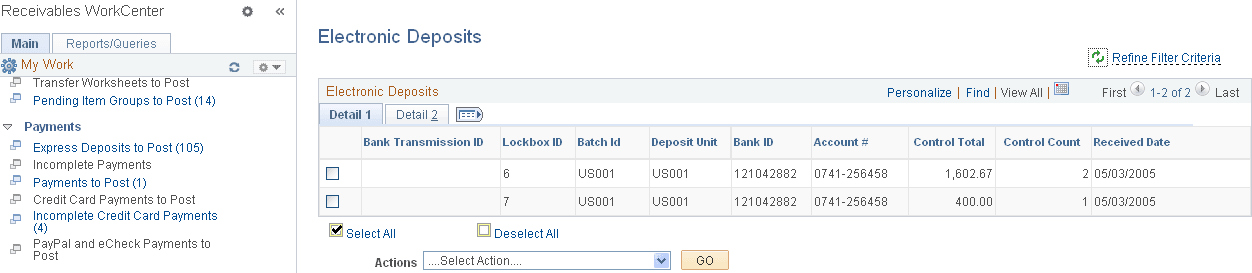
This example illustrates the fields and controls on the Electronic Deposits Page - Detail 1 Tab.
This example illustrates the fields and controls on the Electronic Deposits Page - Detail 2 Tab.
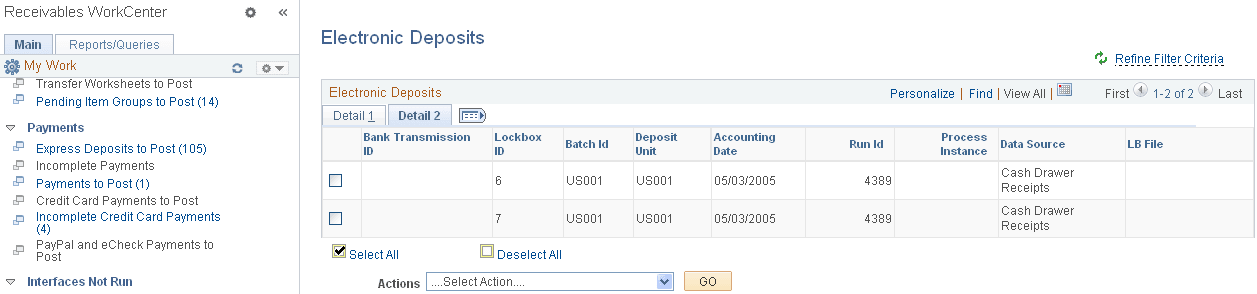
The Electronic Deposits grid shows these items:
-
EDI 820
-
EDI CREEXT
-
Lockboxes
-
Electronic Bank Statements
-
EFT payment files
-
Cash Drawer Receipts
-
Spreadsheet Payments
| Field or Control | Description |
|---|---|
|
Actions |
Select the following action from the list to apply to all electronic deposits shown in the grid, and click the GO button: Process Payment Interface This grid does not allow individual payments to be selected for processing. When you select the Process Payment Interface action, the system opens the Payment Interface page, where you can select the data sources to run, and initiate the Payment Loader Application Engine process. See Using EDI and Split Stream Processing. The run control ID for this process is generated using auto-numbering with this prefix: ARWC_PYLD. |