Incomplete Credit Card Payments Page
Use the Incomplete Credit Card Payments page (AR_WC_PYMNT_SEL) to review credit card payments that have not been authorized or settled. Select and correct, resubmit, or delete one or more incomplete credit card payments.
Navigation:
Click the Payments: Incomplete Credit Card Payments link.
This example illustrates the fields and controls on the Incomplete Credit Card Payments Page - Detail 1 Tab.
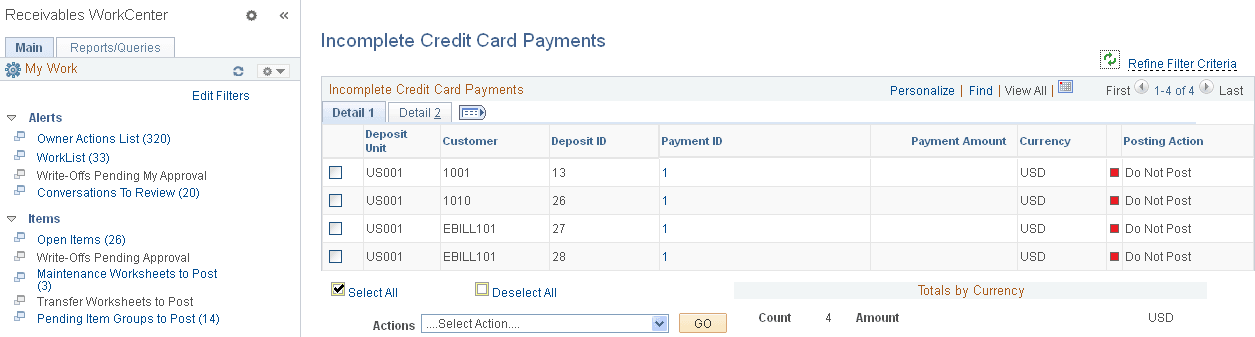
This example illustrates the fields and controls on the Incomplete Credit Card Payments Page - Detail 1 Tab.
| Field or Control | Description |
|---|---|
|
Payment ID |
Click the link associated with a payment ID to access the Credit Card Worksheet page (Accounts Receivable, Credit Cards, Credit Card WorkBench, Update Worksheet), where you can review credit card payments. See Creating Credit Card Payments Using the Credit Card Worksheet. |
|
|
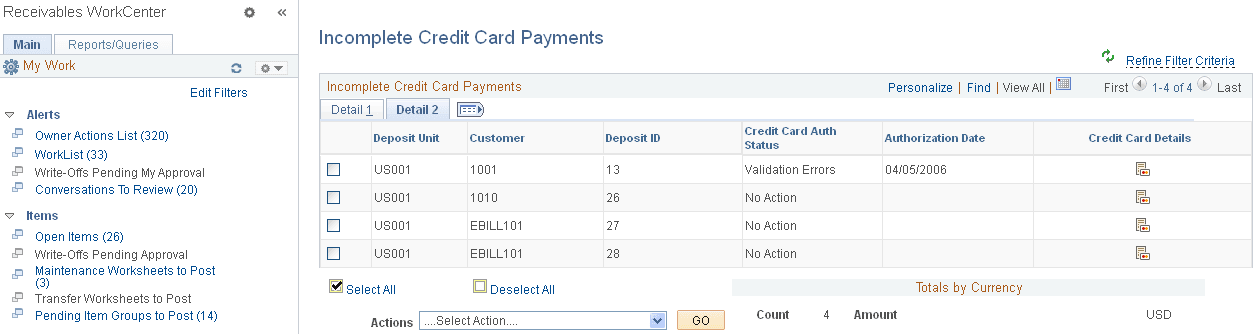
Click the Credit Card Details icon to open the Credit Card Details page (Accounts Receivable, Credit Card, Credit Card Workbench, and click the Credit Card Details button, or click the Pay Balance by Credit Card link on the Account Overview - Balances page), where you can view or modify the customer's credit card details and settle a credit card transaction. |
|
Actions |
Perform an action on one or more incomplete credit card payments that you select in the Incomplete Credit Card Payments grid, and click the GO button. Choose from these actions:
You can also perform actions on incomplete credit card payments on the Credit Card WorkBench (Accounts Receivable, Credit Cards, Credit Card WorkBench). |
