Revenue Estimate Exceptions Page
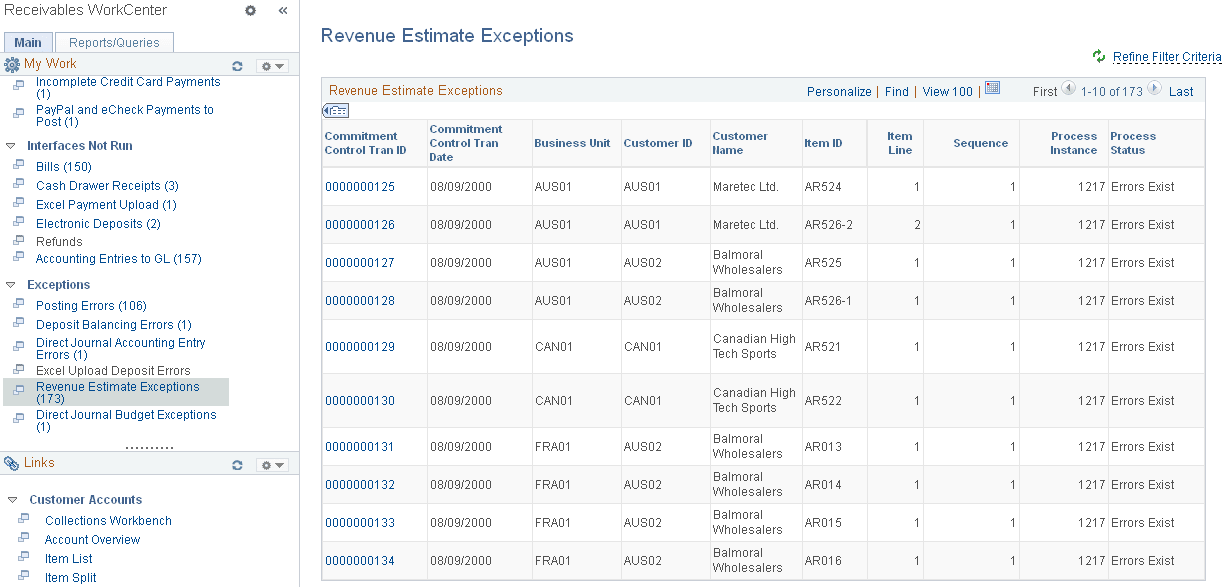
Use the Revenue Estimate Exceptions page (AR_WC_INTFC_SEL) to review Revenue Estimate budget checking errors.
Navigation:
Click the Exceptions: Revenue Estimate Exceptions link.
This example illustrates the fields and controls on the Revenue Estimate Exceptions Page.
| Field or Control | Description |
|---|---|
|
Commitment Control Tran ID (commitment control transaction ID) |
Click the link associated with a commitment control transaction ID to open the Revenue Estimate (KK_XCP_AR1) component (Commitment Control, Review Budget Check Exceptions, Revenues, Review Revenue Estimate), where you can review the budget exceptions and, if you have authority, to override specific budgets for a failed transaction as well as all budgets for a failed transaction. |