Setting Up ePayment Profiles
Pages Used to Set Up ePayment Profiles
| Page Name | Definition Name | Usage |
|---|---|---|
|
AR_EPAY_PRFL |
Create electronic payment profiles. |
|
|
Bank/Payment Options Page |
BUS_UNIT_TBL_AR4 |
Define an ePayment Profile for an individual Receivables business unit. See Setting Up ePayment Options for Individual Business Units and the Receivables Definition - Bank/Payment Options Page. |
Understanding Setting Up ePayment Profiles
Electronic payment (ePayment) profiles enable you to control the selection of open items for ePayment processing and the processing of ePayment worksheets that have been created. The Electronic Payment Scheduler Application Engine process (AR_EPY_PRCS) uses ePayment profiles to control the batch creation of ePayment worksheets.
Electronic Payment Profile Page
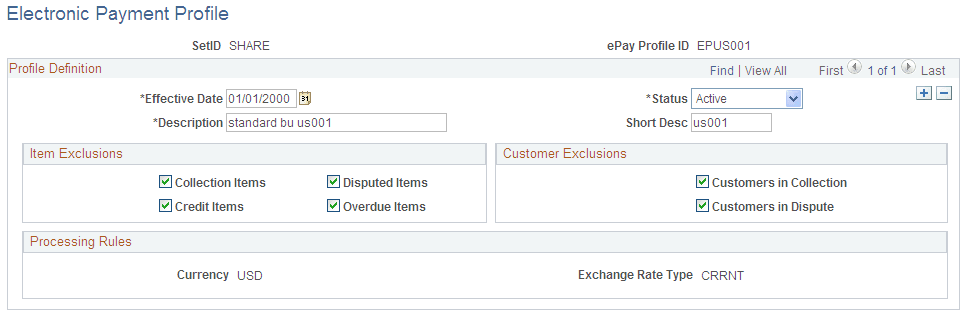
Use the Electronic Payment Profile page (AR_EPAY_PRFL) to set up electronic payment profiles.
Navigation:
This example illustrates the fields and controls on the Electronic Payment Profile page. You can find definitions for the fields and controls later on this page.
Profile Definition
| Field or Control | Description |
|---|---|
|
Effective Date |
Enter an effective date, that is, when the table row becomes effective, or the date that an action begins. The PeopleSoft system supports the concept of effective-dated rows. Note: The EFFDT field is almost always a key. Specify the descending key attribute to display the row with the most recent effective date first. |
|
Description and Short Desc |
Enter a description and a shorter version of the description for this ePayment profile. |
|
Status |
Select from Active or Inactive. |
|
Item Exclusions |
Use the check boxes in the Item Exclusions group box to prevent AR Electronic Payment Processing (AR_EPY_PRCS) from selecting certain types of items when it creates electronic payments and builds the worksheet. Select from these options:
|
|
Customer Exclusions |
Use the check boxes in the Customer Exclusions group box to prevent AR Electronic Payment Processing (AR_EPY_PRCS) from selecting items for customers who are in collection or dispute. |
|
Processing Rules |
Displays Currency and Exchange Rate Type. As of the general availability of PeopleSoft Receivables 9.2, the system supports only USD. |