Setting Up Hold and Message Codes for Credit Holds
Pages Used to Define Hold and Message Codes for Credit Holds
| Page Name | Definition Name | Usage |
|---|---|---|
|
HOLD_CD |
Define hold codes. Create a hold code for each reason that you use for putting a customer on hold. |
|
|
MESSAGE_TBL |
Define message codes and select the message type. |
Understanding Hold and Message Codes
To define hold and message codes for credit holds, use the Hold Codes (HOLD_CD) and Messages (MESSAGE_TBL) components.
When you attach messages to customers regarding their accounts, you must enter a message code. The codes that you define on the Messages page comprise the prompt list for the message field. For each code, you supply message text and define an action to take. You must select Credit Related Message for the message type for credit hold messages.
When you place a customer on a credit hold, you must enter a message code that is designated as a credit related message. PeopleSoft Receivables uses hold codes in two ways:
-
The Condition Monitor process checks for a Credit Hold condition and takes action if a credit hold exists on a customer's account.
-
When you use the Place a Customer on Hold action in an action template, you specify the message code that is associated with the hold code as an action parameter that you want to place on the customer's account.
Hold Codes Page
Use the Hold Codes page (HOLD_CD) to define hold codes.
Create a hold code for each reason that you use for putting a customer on hold.
Navigation:
The codes that you define on this page appear on the Messages page for customers designated with an action of Hold.
Messages Page
Use the Messages page (MESSAGE_TBL) to define message codes and select the message type.
Navigation:
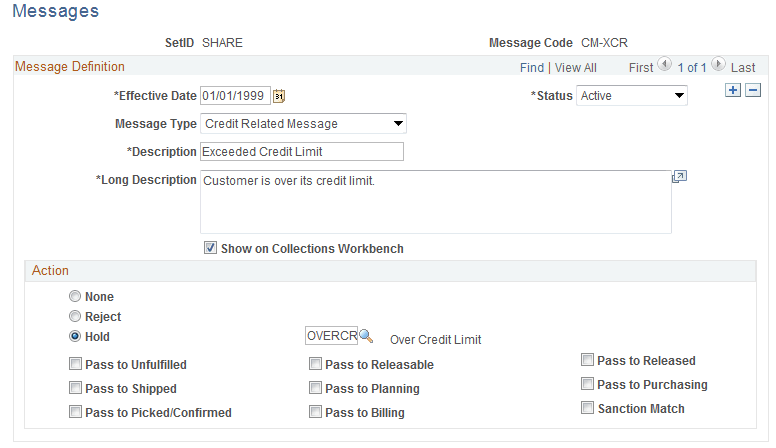
This example illustrates the fields and controls on the Messages page. You can find definitions for the fields and controls later on this page.
| Field or Control | Description |
|---|---|
|
Message Type |
Select Credit Related Message for credit holds. |
Specify a value in the Action group box.
| Field or Control | Description |
|---|---|
|
None |
Indicates no action. |
|
Reject |
Indicates that the system will reject an order if you attach this message to the customer. Only PeopleSoft Order Management uses the Reject action. It has no effect on PeopleSoft Receivables processing. |
|
Hold |
Indicates that a customer is on hold. If you select Hold, you must enter an appropriate hold code, one that you established on the Hold Codes page. If a customer has an action of Hold on the Messages page, the value appearing in the Hold Code field is the short description that you defined on the Hold Codes page. Several check boxes become available if you select Hold. These check boxes are used only by PeopleSoft Order Management. |
Note:
The action value that you select on this page displays in the Action field on the Messages page for the customer.