Write-Offs Pending My Approval Page
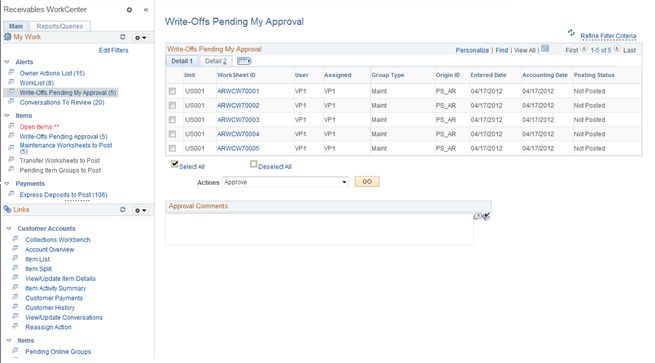
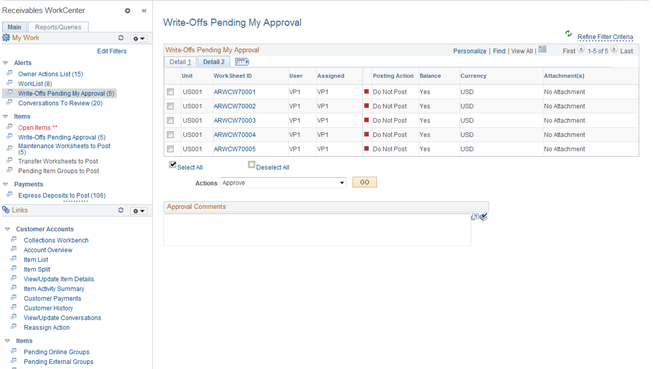
Use the Write-Offs Pending My Approval page (AR_WC_ITEMS_SEL) to review write-offs submitted for approval by a requestor and write-offs pushed back from a higher level approver. You can approve, deny, or pushback one or more worksheets.
Navigation:
-
Click the Items: Write-Offs Pending My Approval link.
-
This example illustrates the fields and controls on the Write-Offs Pending My Approval Page - Detail 1 Tab.
This example illustrates the fields and controls on the Write-Offs Pending My Approval Page - Detail 2 Tab.
| Field or Control | Description |
|---|---|
|
Worksheet ID |
Click the link associated with a worksheet ID to show worksheet details on the Worksheet Application page (Accounts Receivable, Receivables Maintenance, Maintenance Worksheet, Update Maintenance Worksheet, Worksheet Application). |
|
Actions |
Perform an action on one or more worksheets that you select in the Write-Offs Pending My Approval grid, and click the GO button. Choose from these actions:
When you select the Approve action, the system displays the Comments field, where you can enter free-form comments. The approver can also review the write-off and choose to approve, deny, or pushback using the Worksheet Application page for Payment, Draft, or Maintenance worksheets. The bottom of the Worksheet Application pages display buttons to approve or deny the write-off amount and contains a section to enter comments. |