Unassigned Resources Page
Use the Unassigned Resources (RS_WC_ASSN_EXP1) page to display all active Resources without an assignment.
Navigation:
This example illustrates the fields and controls on the Unassigned Resources page.
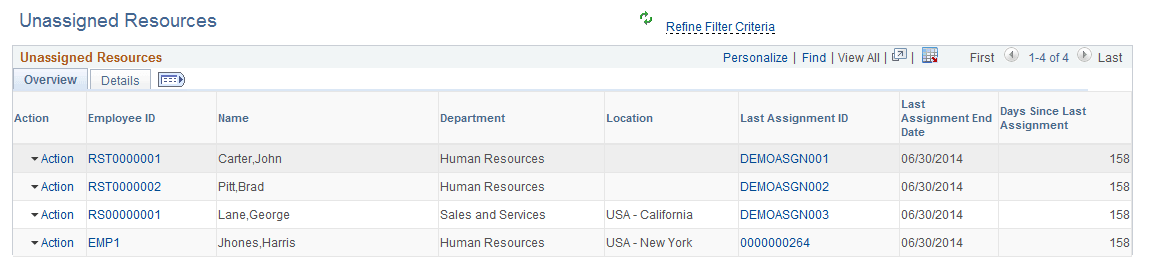
The Unassigned Resources exception displays the last assignment and the end date of the last assignment for the Resource. The following actions for available for this exception:
| Field or Control | Description |
|---|---|
|
Review Resource Work History |
The Review Resource Work History action opens the Resource Work History page displaying the list of all work experiences of the Resource . |
|
Review Resource Profile |
The Review Resource Profile action opens the Resource Profile page giving details about the Resource. You can use this page to review consolidated resource profile information. |
|
Create Resource Appointment |
The Create Resource Appointment action opens the Create Appointment page. You can use the Create Appointment page to create Appointments for the Resource. |
|
Manage Resource Utilization |
Manage Resource Utilization action launches the Manage Utilization page giving full details of the Resource. You can use the Manage Utilization page to view key resource statistics and the resource's current assignment status. |