Setting Up Performance Level Codes
To set up performance level codes, use the Performance Level Codes (SPB_LVL_CD) component.
This topic discusses how to set up performance level codes.
Page Used to Set Up Performance Level Codes
| Page Name | Definition Name | Usage |
|---|---|---|
|
SPB_LVL_CD |
Determine various levels at which suppliers perform. |
Performance Level Code Page
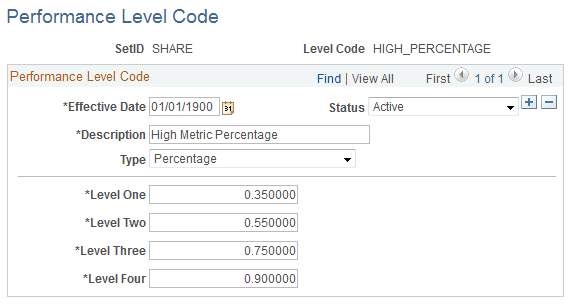
Use the Performance Level Code page (SPB_LVL_CD) to determine various levels at which suppliers perform.
Navigation:
This example illustrates the fields and controls on the Performance Level Code page. You can find definitions for the fields and controls later on this page.
| Field or Control | Description |
|---|---|
|
Type |
Select Absolute Value. |
|
Level One, Level Two, Level Three, and Level Four |
Enter four maximum range values for the performance level that you create. Use these values to determine the range for evaluating supplier performance levels. For example, you might create performance level code INTERVIEW to determine the number of candidate interviews that a supplier is scheduled for per requisition. The performance levels for the INTERVIEW performance code might include the following levels: Level One = 2, Level Two = 4, Level Three = 6, and Level Four = 8. In this example, level four represents the best possible score and level one represents the worst possible score. Note: Reverse levels as needed. |