Setting Up Supplier Scoring Rules
To set up supplier scoring rules, use the Supplier Scoring Rules (SPB_SUP_SCORE_RULE) component.
This topic discusses how to set up supplier scoring rules.
Pages Used to Set Up Supplier Scoring Rules
| Page Name | Definition Name | Usage |
|---|---|---|
|
SPB_SUP_SCORE_RULE |
Define a supplier scoring rule that calculates supplier scoring metrics, level codes, weight, and performance-level ranges. |
Supplier Scoring Rule Page
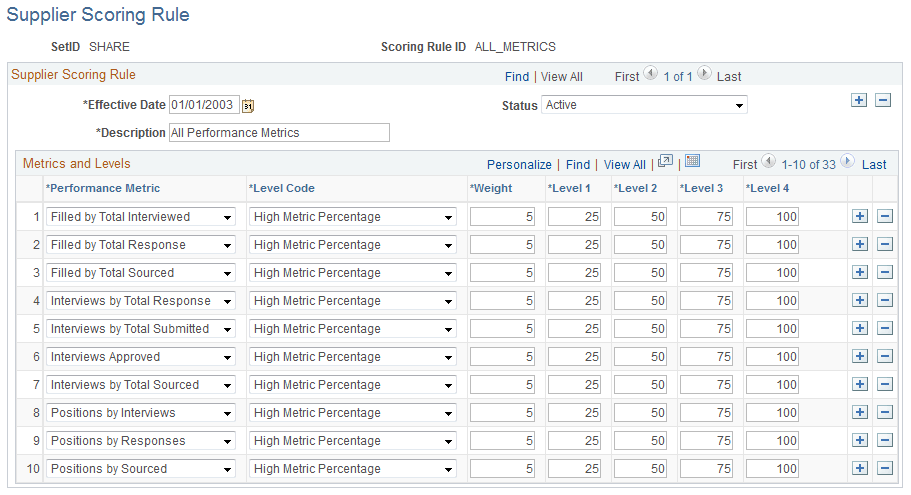
Use the Supplier Scoring Rule page (SPB_SUP_SCORE_RULE) to define a supplier scoring rule that calculates supplier scoring metrics, level codes, weight, and performance-level ranges.
Navigation:
This example illustrates the fields and controls on the Supplier Scoring Rules page. You can find definitions for the fields and controls later on this page.
| Field or Control | Description |
|---|---|
|
Performance Metric |
Select one or more performance elements to calculate the supplier score. |
|
Weight |
Enter the best possible weight that you want suppliers to receive. The weightings reflect the relative importance for each metric included in the rule. Note: Enter desired weighting amount. The weight value need not equal 100 percent. |