Defining Manufacturer IDs
To define manufacturers, use the Manufacturers component (MANUFACTURER).
This section discusses how to create manufacturer IDs.
PeopleSoft Purchasing can link items to multiple manufacturers by using the manufacturer ID and the manufacturer's item ID.
This optional feature is useful for items that you purchase that are produced by more than one manufacturer. If you choose to establish manufacturer IDs, you can assign them to items so that they appear as default values on purchasing transactions. Alternatively, you have to manually specify the manufacturer on the purchasing transaction.
Page Used to Define Manufacturer IDs
| Page Name | Definition Name | Usage |
|---|---|---|
|
MANUFACTURER |
Create manufacturer IDs for the manufacturers of items that you purchase. |
Manufacturers Page
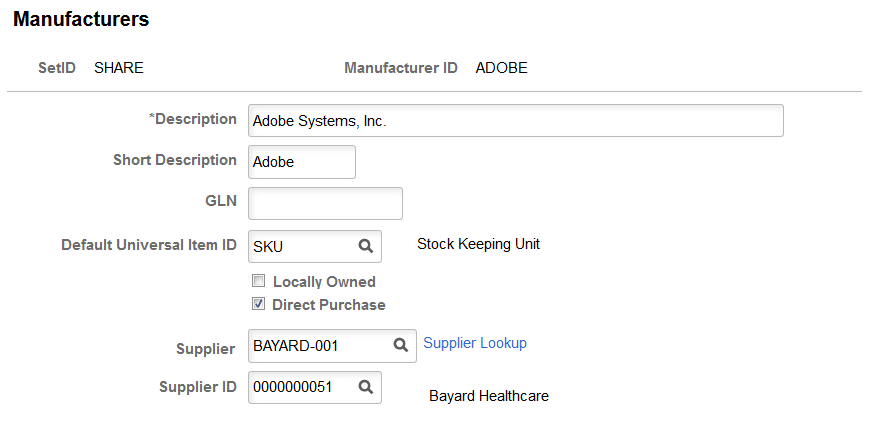
Use the Manufacturers page (MANUFACTURER) to create manufacturer IDs for the manufacturers of items that you purchase.
Navigation:
This example illustrates the fields and controls on the Manufacturers page.
| Field or Control | Description |
|---|---|
|
Default Universal Item ID |
Assign a default UPN type code. A manufacturer may use more than one type of UPN. Typically, a manufacturer uses one type of UPN most of the time. |
|
Direct Purchase |
Select this option to allow purchases directly from the manufacturer. When you select this option, the Supplier and Supplier ID fields appear. You must specify a supplier for the manufacturer. Once you establish the manufacturer-supplier relationship, you can create a Direct Purchase Manufacturer contract. For more information on direct purchasing, see Understanding Direct Purchase for Distributor and Manufacturer Contracts |
|
Supplier |
Specify a supplier (by name) for the manufacturer. You can only select suppliers not currently linked to a manufacturer. After you specify the supplier, the Supplier ID field automatically populates. |
|
Supplier ID |
Specify a supplier (by ID) for the manufacturer. You can only select suppliers not currently linked to a manufacturer. After you specify the supplier, the Supplier field automatically populates. |
Related Topics