DSO (Days Sales Outstanding) Trend Tile and Pivot Page
Use the DSO Trend tile to view the actual DSO30 over the prior 4 months (which excludes the current month).
This example illustrates the fields and controls on the DSO Trend Tile.
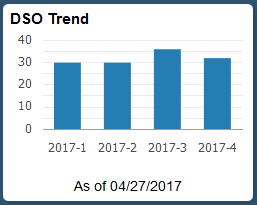
Select the DSO Trend tile to view the pivot grid. On the Y-axis, the tile shows the Accounting Period, or Days or Amount. On the X-axis, the tile shows Period Name.
To filter data displayed in the pivot grid, select an available period name.
Add, delete, or move the following pivot grid columns as desired:
-
Business Unit
-
Customer
-
Fiscal Year
-
Accounting Period
-
Days
-
Amount
-
Currency