Approving Strategic Sourcing Project Plans
Sourcing plans that require approval are routed only to users with the role of Plan Approver. Sourcing plans must be posted before they can be approved.
This topic discusses how to post, approve, or deny Strategic Sourcing plans.
Page Used to Approve Strategic Sourcing Plans
| Page Name | Definition Name | Usage |
|---|---|---|
|
AUC_PLN_APP_PG |
Approve or deny sourcing plans. |
Sourcing Plan Workbench Page
Use the Sourcing Plan Workbench page (AUC_PLN_WKBNCH_PG) to post Strategic Sourcing plans.
Navigation:
To post a sourcing plan for approval:
-
Select the sourcing plan that you want to post.
You can also post a sourcing plan by using the Define Sourcing Plan Basics page ().
-
Select the sourcing plan for posting.
A new page opens that accesses the Define Sourcing Plan Basics page.
-
Click the Post Plan button.
Sourcing Plan Approval Page
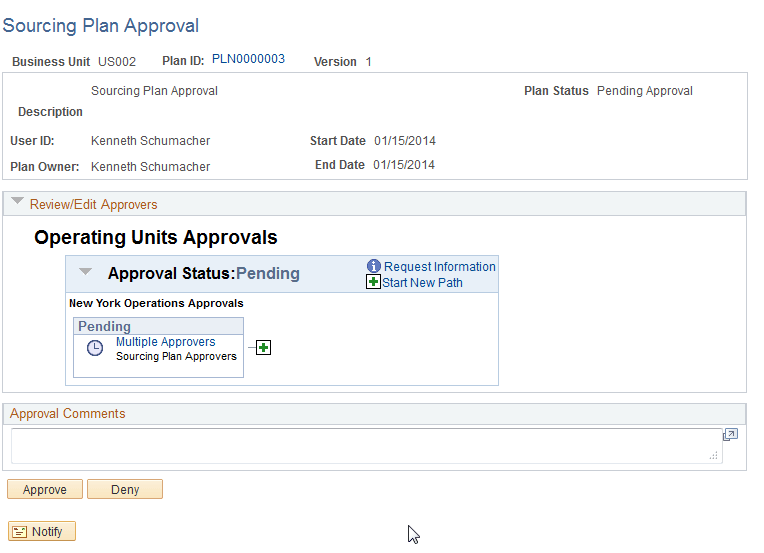
Use the Sourcing Plan Approval page (AUC_PLN_APP_PG) to approve or deny sourcing plans.
Navigation:
Select
Click the sourcing plan that is pending approval.
This example illustrates the fields and controls on the Sourcing Plan Approval page. You can find definitions for the fields and controls later on this page.
| Field or Control | Description |
|---|---|
|
Review/Edit Approvers |
If approvals are required, the appropriate individuals' names appear. Use this group box to edit the approvers. |
|
Approval Comments |
Add any comments concerning the approval or denial of the sourcing plan. |
|
Approve |
Click to approve the sourcing plan. |
|
Deny |
Click to deny (disapprove) the sourcing plan. |
The plan owner receives a notification indicating whether the plan was approved or denied. The status of the sourcing plan is updated after the action of Post or Approval has occurred.