Creating Pay Run IDs
To create pay run IDs, use the Pay Run Table (PAY_RUN_TABLE) component. Use the PAY_RUN_TABLE component interface to load data into the tables for this component.
These topics provide an overview and discuss how to create pay run IDs.
Note:
The information in these topics applies to Oracle's PeopleSoft Payroll for North America and Oracle's PeopleSoft Payroll Interface. The information in these topics does not apply to Oracle's PeopleSoft Global Payroll.
Page Used to Create Pay Run IDs
| Page Name | Definition Name | Usage |
|---|---|---|
|
PAY_RUN_TABLE |
Create pay run IDs to combine pay calendar entries from different pay groups for processing. |
Understanding Pay Run IDs
Use pay run IDs to indicate to the system which pay calendar entries to process together. A pay run ID identifies a single pay calendar to process. If you have several pay groups, you can process them together in a single run by assigning them the same pay run ID.
Generally, all calendar entries that share a pay run ID have the same pay end date, but not necessarily the same pay frequency. For example, if you have a semi-monthly and a monthly pay calendar, both calendars can be processed together for the month-end run, because they have identical pay period end dates.
Note:
A pay run ID must be unique throughout payroll history. You must create pay run IDs in the Pay Run table before you enter them on the pay calendar. The pay run ID may be up to 10 characters. PeopleSoft suggests that you use as many of the 10 available characters as is necessary to ensure that your pay run ID is easily identifiable.
Pay Run Table Page
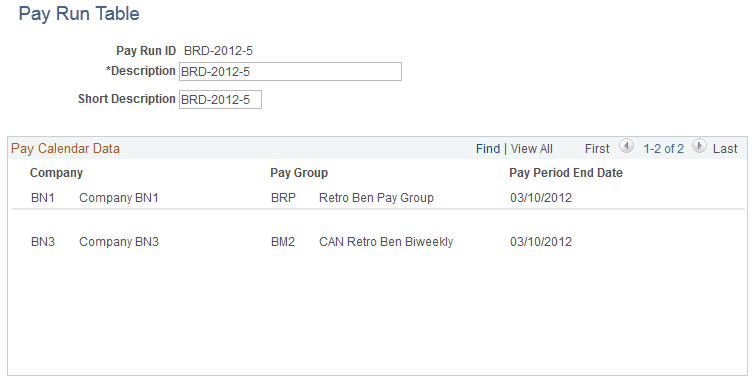
Use the Pay Run Table page (PAY_RUN_TABLE) to create pay run IDs to combine pay calendar entries from different pay groups for processing.
Navigation:
This example illustrates the fields and controls on the Pay Run Table page. You can find definitions for the fields and controls later on this page.
| Field or Control | Description |
|---|---|
|
Short Description |
Enter a short description of the pay run. This description appears on various delivered payroll reports (for example, PAY002, the Payroll Register). It also appears on the Run Control when you enter the pay run ID for Paysheet Creation, Payroll Calculation, and Payroll Confirmation. |
|
Company, Pay Group, and Pay Period End Date |
The Pay Calendar Data group box displays all the pay calendar entries grouped under the pay run ID. After you enter the pay run IDs on the Pay Calendar table, return to this page to check the pay calendar data assigned to each pay run ID. |