Defining a Rating Model
Prior to migrating profile data to Fusion, you must define a specific rating model. The rating model represents a set of numeric codes for ranking an employee’s degree of expertise or experience in a competency. This section discusses how to define the LANG rating model.
Pages Used to Define a Rating Model
| Page Name | Definition Name | Usage |
|---|---|---|
|
RATING_MDL_TBL |
Define the LANG rating model. |
Rating Model Page
Use the Rating Model page (RATING_MDL_TBL) to define the LANG rating model.
Navigation:
This example illustrates the fields and controls on the Rating Model page.
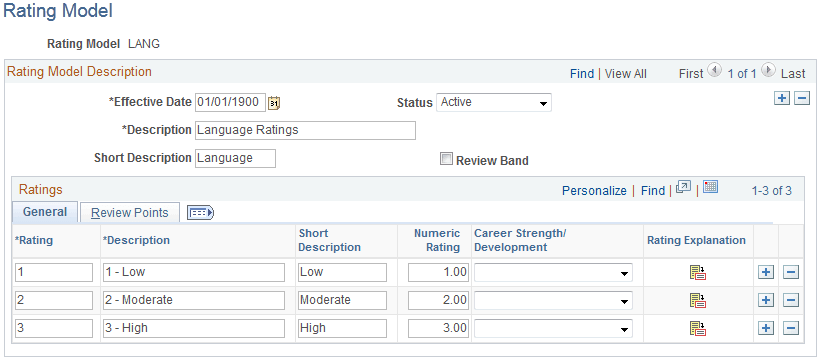
Rating Model Description
| Field or Control | Description |
|---|---|
|
Effective Date |
Enter an effective date of 01/01/1900. |
|
Status |
Set the status to Active. |
|
Description |
Enter a description of Language Ratings. |
|
Short Description |
Enter a short description of Language. |
|
Review Band |
Leave this check box deselected. |
General Tab
Enter three rows with the following values:
| Rating | Description | Short Description | Numeric Rating |
|---|---|---|---|
|
1 |
1 - Low |
Low |
1.00 |
|
2 |
2 - Moderate |
Moderate |
2.00 |
|
3 |
3 - High |
High |
3.00 |
Note:
Leave the Career Strength/Development field blank for all three rows.
Review Points Tab
This example illustrates the fields and controls on the Review Points tab on the Rating Model page.
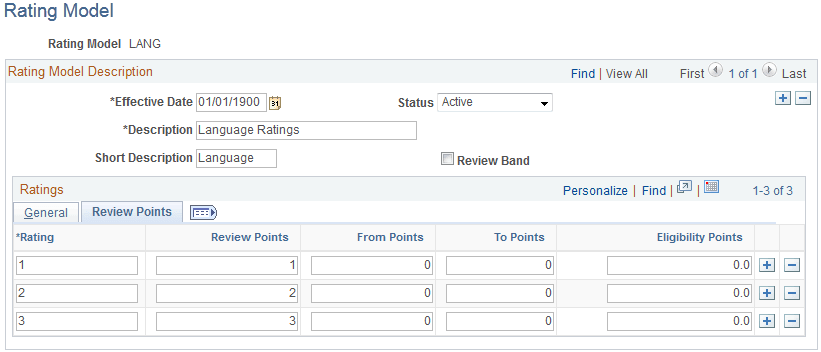
Enter the following values for the three ratings you entered on the General tab:
| Rating | Review Points | From Points | To Points | Eligibility Points |
|---|---|---|---|---|
|
1 |
1 |
0 |
0 |
0.0 |
|
2 |
2 |
0 |
0 |
0.0 |
|
3 |
3 |
0 |
0 |
0.0 |