Direct Deposit Installation Options and Data Masking
The installation options for direct deposit determine the masking of bank account numbers on direct deposit pages.
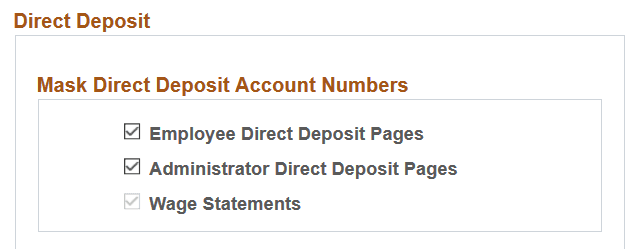
This example illustrates the Direct Deposit section of the Payroll for NA Installation page.
Wage Statements
When the Enable Encryption option is enabled on the HCM Options Page of the Installation Table, the Wage Statements option becomes selected and not editable by default. All account numbers on the wage statements, for both HTML (online pages) and PDFs will display as masked after the encryption is run.
Employee and Administrator Direct Deposit Pages
The masking of account numbers on the employee and administrator direct deposit pages is controlled by the Employee Direct Deposit Pages and Administrator Direct Deposit Pages options on the HCM Options page.
After encryption is run for the DIR_DEP_DISTRIB record, all account numbers will display as masked on the PeopleSoft ePay: Direct Deposit Page and PeopleSoft Payroll for North America: Request Direct Deposit Page if the options are selected. An exception to this is when the user is assigned the Bank Account Admin role, and this role is defined on the Grant Unmasked Access Page for the DIR_DEP_DISTRIB record. With this role, the user can view unmasked account numbers on the Request Direct Deposit page.
If these installation options are deselected, the account numbers on the same pages will not be masked.
Note:
When DIR_DEP_DISTRIB is encrypted, the account numbers in the database are still masked even if the installation options for the direct deposit pages are deselected when DIR_DEP_DISTRIB is encrypted.