Including Records in the Person ID Change and Delete Processes
To include records in the Person ID Change or Delete process, use the Person ID Inclusion (ID_DEL_INCL_TABLE) component.
The following video provides an overview of person ID inclusion:
Video: Image Highlights, PeopleSoft HCM Update Image 26: Person ID Deletion and Correction
Page Used to Include Records in the Person ID Change and Delete Processes
| Page Name | Definition Name | Usage |
|---|---|---|
|
ID_DEL_INCL_TABLE |
Identify records that should be included in the Person ID Change and Person ID Delete processes. |
Person ID Inclusion Page
Use the Person ID Inclusion page (ID_DEL_INCL_TABLE) to identify records that should be included in the Person ID Change and Person ID Delete processes.
Navigation:
This example illustrates the fields and controls on the Person ID Inclusion page.
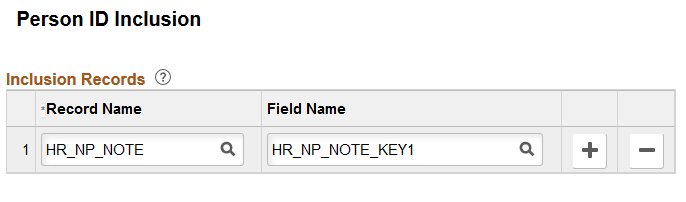
Use this page to identify records and fields that you want to include in the Person ID Change and Person ID Delete processes. These should be records that store the Employee ID but are not considered by these processes. You must specify both the record and field; if you indicate only the record name without the field name, nothing will be changed or deleted during the process.
Changes made to this page will impact both the change and delete processes.
Note:
To exclude records that are already considered in the change or delete processes, see Restricting the Deletion of IDs.