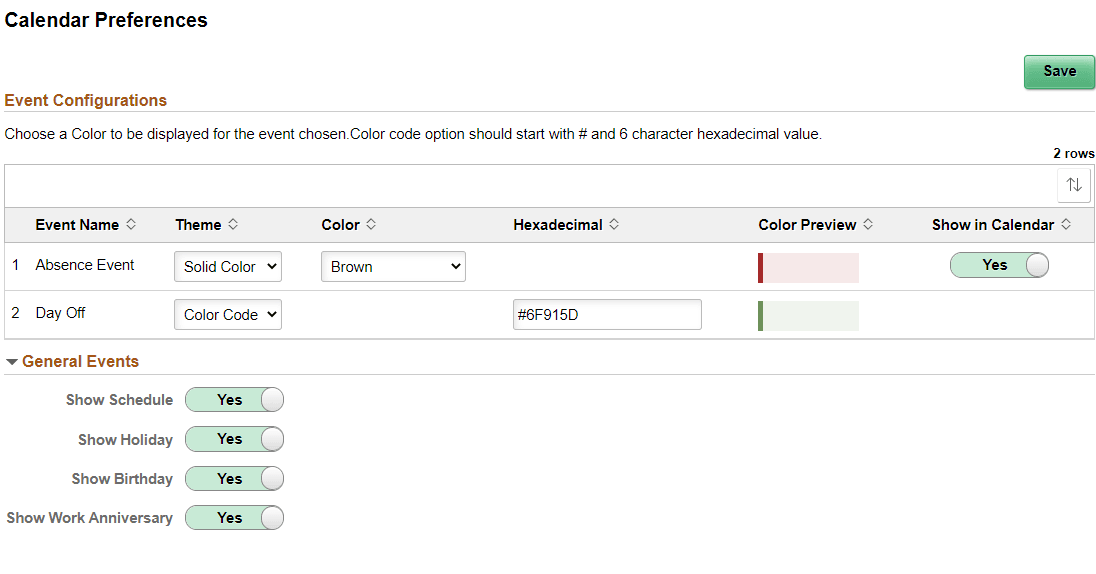
Calendar Preferences page
Managers and Employees can use the Calendar Preferences to set up their calendar preferences (HCSC_CAL_USPREF_FL).
This example illustrates the fields and controls on the Calendar Preferences page.
| Field or Control | Description |
|---|---|
|
Event Name |
The event name displayed in the Day Detail modal page. |
|
Theme |
Select Solid Color or Color Code to define the color of the event. |
|
Color |
If Solid Color is selected, the Color field displays and the desired color can be selected from the drop-down. |
|
Hexadecimal |
If Color Code is selected, the hexadecimal field displays and the hexadecimal code must be entered to define the desired color. |
|
Color Preview |
Previews the color selected in the previous fields. |
|
Show in Calendar |
Select the slider to Yes or No to show it in the calendar. |
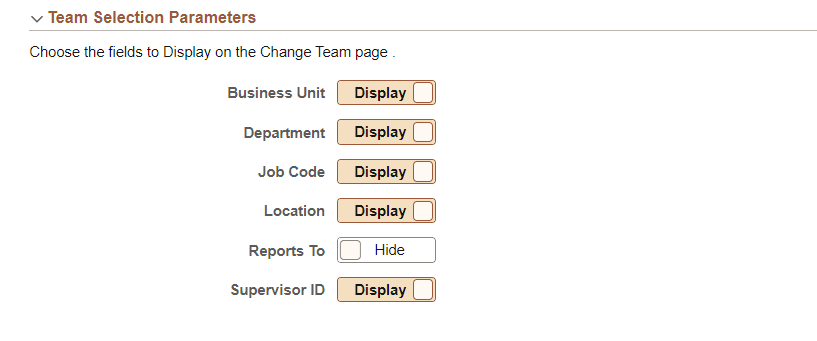
Administrators can use the Team Selection Parameters section to choose the fields to display on the Select Team page for the Administrator Calendar view.
This example illustrates the fields and controls on the Team Selection Parameters on the Calendar Preferences page for administrators.