Setting Up Process Lists
To set up a process list, use the Process Lists component (GP_PROCESS).
Pages Used to Set Up Process Lists
| Page Name | Definition Name | Usage |
|---|---|---|
|
GP_PIN |
Name a process list and define its basic parameters. |
|
|
GP_PROCESS |
Identify sections comprising the process list and the order of execution. |
Understanding Process List Setup
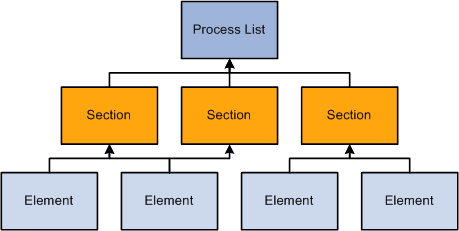
Before creating a process list, you define the sections to include in the process, grouping sets of elements into sections for addition to your process list. In your process list, you can use conditional logic to specify when each section is executed.
This diagram illustrates the relationship between elements, sections, and process lists.
You can create multiple process lists for absence processing. For example, you can create a separate process list for entitlement and take or create one process list that handles both, depending on how you run your processes.
Having created a process list, you attach it to one or more calendars (through a run type). A calendar determines:
-
Who's processed.
Specified by the pay group and payee selection criteria on the calendar.
-
What's processed.
Specified by the process list associated with the calendar.
-
What period of time and frequency apply.
Specified by the period ID linked to the calendar.
When running a process, the system reads the pay period end date for the calendar; finds the appropriate effective-dated process list; and processes the selected payees, one by one.
Related Topics
Process List Name Page
Use the Process List Name page (GP_PIN) to name a process list and define its basic parameters.
Navigation:
You must enter the basic parameters of the process list on the Process List Name page. All elements within Absence Management share the same name page (GP_PIN).
Note:
On the Process List Name page, Calendar Period End Date is the only value for the Definition as of Date field. When you run the absence process, the system reads the calendar period end date to determine which effective-dated process list and sections to use.
Related Topics
Process Lists - Definition Page
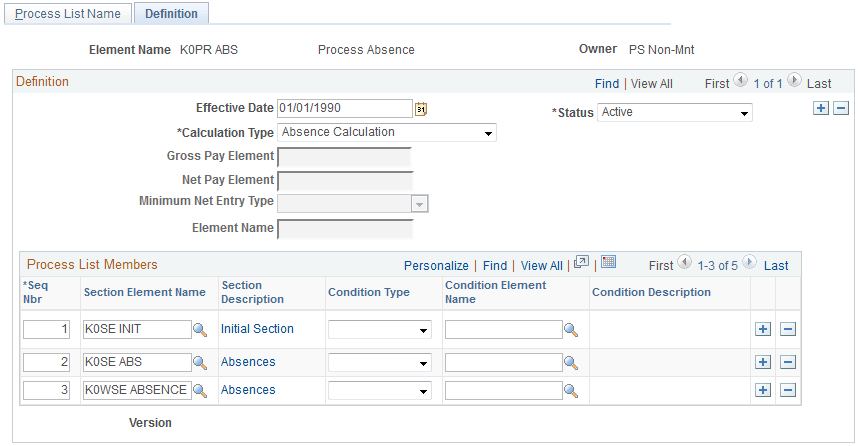
Use the Process Lists -Definition page (GP_PROCESS) to identify sections comprising the process list and the order of execution.
Navigation:
This example illustrates the fields and controls on the Process Lists -Definition page.
| Field or Control | Description |
|---|---|
|
Calculation Type |
The system displays Absence Calculation. You cannot change this value. |
|
Gross Pay Element |
This field does not apply. It is used with Global Payroll only. |
|
Net Pay Element |
This field does not apply. It is used with Global Payroll only. |
|
Minimum Net Entry Type |
This field does not apply. It is used with Global Payroll only. |
|
Minimum Net Element |
This field does not apply. It is used with Global Payroll only. |
Process List Members
| Field or Control | Description |
|---|---|
|
Section Element Name |
Select the name of the section that you're adding. You can use a section only once in a process list, but you can add the same section to more than one process list. |
|
Condition Type |
Select Formula or Variable to specify a condition for resolving the section that you're adding to the process list. |
|
Condition Element Name |
Required if you selected a condition type. Select the name of the element that defines the condition. If the element resolves to zero, the condition is considered false and the section isn't resolved. If the element resolves to a nonzero value (for example, -2, -1, 1, or 2), the condition is considered true and the system tries resolving the section. |
Related Topics