Using Fluid Candidate Gateway to Set Up Configurable Application Statuses
The Candidate Application Status page allow recruiters to control what status they want to show to the Applicant. You can enter the description for the status of applicants to convey where they are in the recruiting process.
Pages Used to Set Up Configurable Application Statuses
| Page Name | Definition Name | Usage |
|---|---|---|
|
HRS_APPL_STATUS |
Setup the Candidate Gateway configurable application statuses so that candidates can see more specific statuses of their in-process and processed job applications. |
Candidate Application Status Page
Use the Candidate Application Status (HRS_APPL_STATUS) page to setup the Candidate Gateway configurable application statuses so that candidates can see more specific statuses of their in-process and processed job applications.
Navigation:
This example illustrates the fields and controls on the Candidate Application Status page.
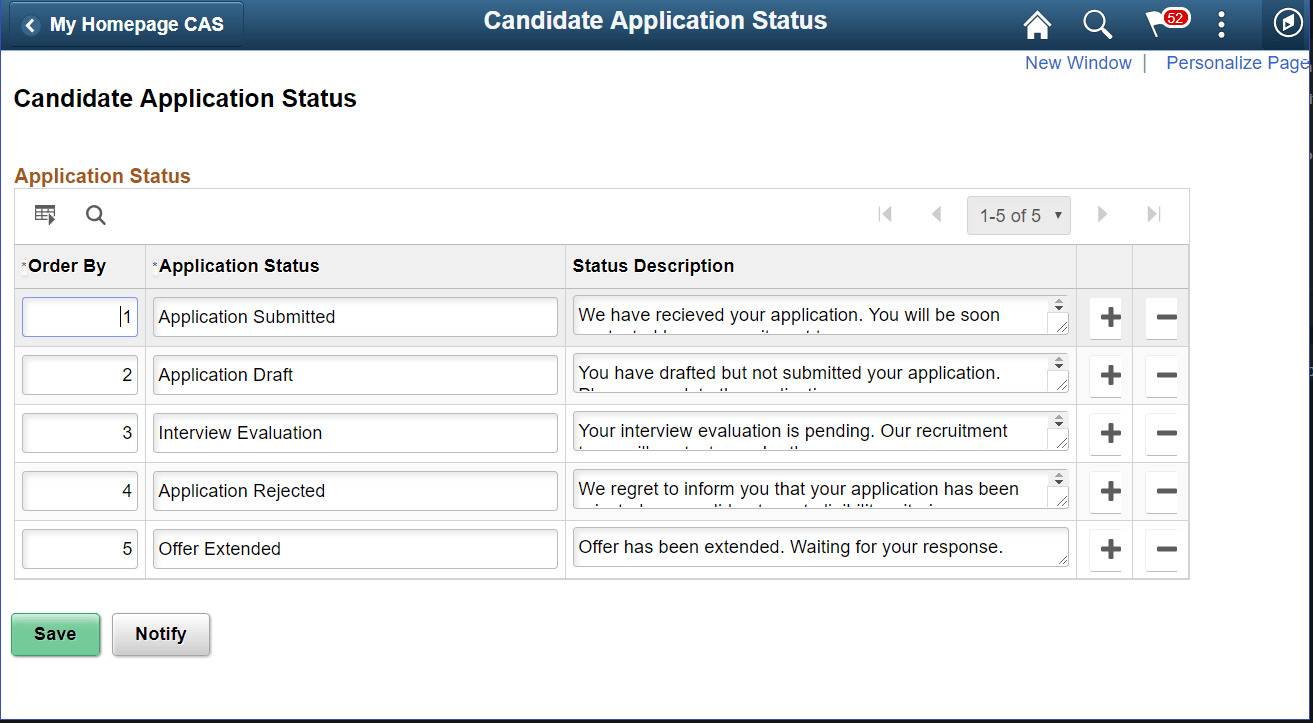
| Field or Control | Description |
|---|---|
|
Order By |
Align the ordering of statuses in a logical sequence within the drop-down field when mapping candidate application statuses on the Status Area page. |
|
Application Status |
Enter the status of the application within 30 characters and with only alpha characters. No numerical or special characters allowed. |
|
Status Description |
Provide a description of the status. |
|
|
Add an application status row. |
|
|
Remove an existing application status row. |


Note:
It is recommended to make changes only after deactivating the Candidate Application Status feature in the Status Area page and after unmapping the statuses for which the changes have to be done. Once changes are done in the Candidate Application Status page, the Candidate Application Status feature in the Status Area page can be activated after the re-mapping.