Setting Up Document Attachment Framework
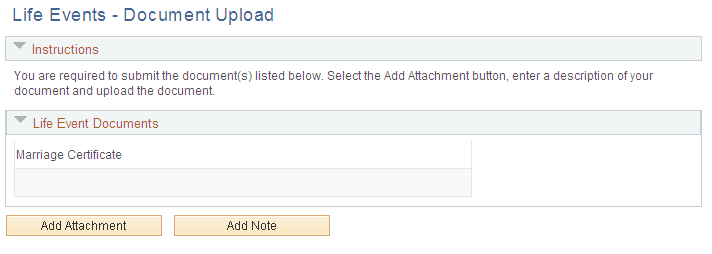
An employee can upload life event documents to PeopleSoft eBenefits using the HR Attachment Framework. Based on the type of life event being processed, the system displays the list of documents to be uploaded.
Page Used to Upload Life Event Documents
| Page Name | Definition Name | Usage |
|---|---|---|
|
HR_ATT_DD_HDR |
Upload life event documents. |
Life Events - Document Upload Page
This example illustrates the Life Events - Document Upload page.
For information on where to approve a document request, see PeopleSoft eProfile Manager Desktop: Using Fluid Approvals to Approve Self Service Transaction Requests and PeopleSoft eProfile Manager Desktop: Pages Used to Approve Self Service Transaction Requests Using Fluid Approvals.
Document Attachment Framework Setup
The following set up is required for the instructions on the Life Events - Document Upload page:
| Object Type | Name |
|---|---|
|
Text ID |
ATT_HEADER_INSTR |
|
Object Owner |
HEB |
|
sub ID |
LE |
The following setup is required for the Attachment Framework:
-
Define Authorizations
-
Define Authorization Entries
-
Define Attachments
-
Configure Keys
-
Maintain Definitions
| Authorization ID | Authorization Options |
|---|---|
|
BN_EDITATT |
View and edit attachments |
|
BN_VIEWATT |
View attachments |
| Authorization Entry | Description |
|---|---|
|
BN_ADOPTCERT |
Adoption Certificate |
|
BN_BIRTHCERT |
Birth Certificate |
|
BN_MARCERT |
Marriage Certificate |
| Configuration ID | Description |
|---|---|
|
BN_CERT |
Certificates |
| Context Key | Configuration ID |
|---|---|
|
Life Event Type |
BN_CERT |
| Authorization Entry | Life Event Type |
|---|---|
|
BN_ADOPTCERT |
Adoption |
|
BN_BIRTHCERT |
Birth |
|
BN_MARCERT |
Marriage |