Banking Page
Use the Banking page (GPSC_BANK_ADD_FL) to review your bank account and payment distribution information.
Navigation:
-
Click the Banking tile that is available on a fluid home page.
-
Click the Banking tile from the PeopleSoft Global Payroll: Global Payroll Dashboard.
-
Click Banking from the PeopleSoft Global Payroll: Fluid Navigation Collection for Global Payroll.
This example illustrates the fields and controls on the Banking page.
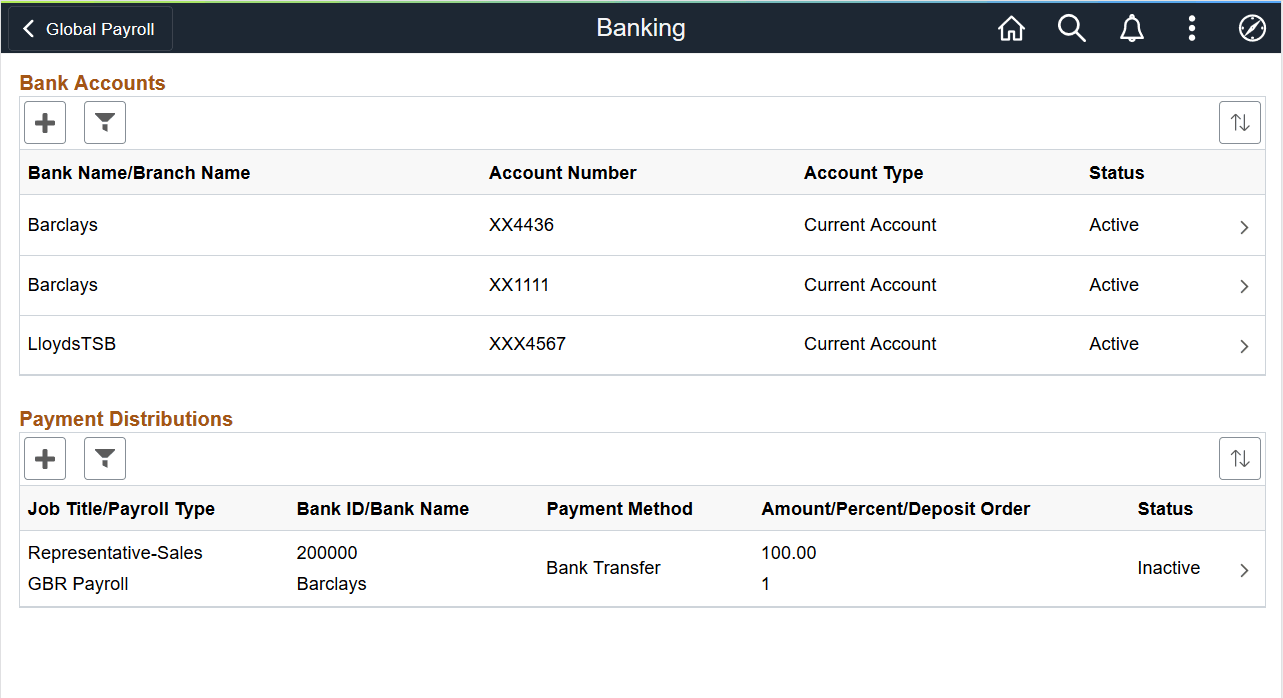
This page displays your bank accounts and payment distributions. To edit bank account information, click a bank account to access the Bank Accounts Page. To edit payment distribution information, click a payment distribution to access the Payment Distribution Page.
Note:
The Payment Distributions grid is available only for employees processed using PeopleSoft Global Payroll.
| Field or Control | Description |
|---|---|
|
|
Click to add a new bank account or payment distribution using the Bank Accounts Page or Payment Distribution Page, respectively. |
|
|
Click to access the Filter page and select criteria to narrow the list of bank accounts or payment distributions. You can filter bank accounts by Status and Account Type, and payment distributions by Status. |
 (Add)
(Add)
 (Filter)