(Classic) Viewing Historical Documents
This topic discusses how to access historical documents in Classic Plus mode.
Note:
A fluid version of ePerformance is now available to support employee performance reviews. For more information, see Understanding Fluid ePerformance.
Pages Used to View Historical Documents
| Page Name | Definition Name | Usage |
|---|---|---|
|
EP_APPR_SELECT |
Access completed documents for employees that you manage or for yourself. |
|
|
My Historical Evaluations for Others Page |
EP_APPR_OTH_SELECT |
Access completed documents for multi-participant evaluations in which you participated. |
<Performance or Development> Document History Page
Use the <Performance or Development> Document History page (EP_APPR_SELECT) or My Historical Evaluations for Others page (EP_APPR_OTH_SELECT) to access completed documents for employees that you manage, for yourself, or for multi-participant evaluations in which you participated.
Navigation:
Note:
These pages are all similar in appearance and usage; only the Performance Document History page is detailed here.
This example illustrates the fields and controls on the <Performance or Development> Document History page.
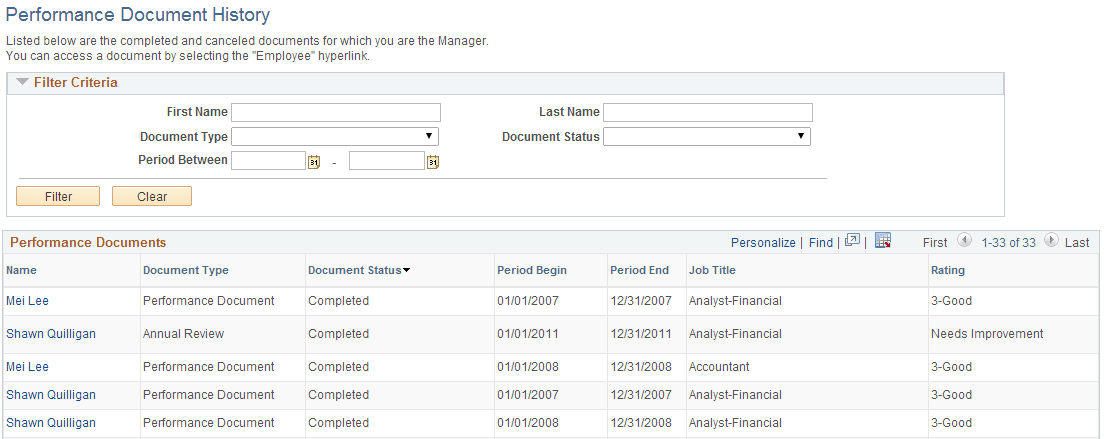
The <Performance or Development> Document History page and My Historical Evaluations for Others page look and function similarly.
Filter Criteria
Enter search criteria to limit which documents appear in the list.
Note:
This page region appears only if you access the page from Manager Self-Service.
| Field or Control | Description |
|---|---|
|
First Name and Last Name |
Enter the first and last names of the employee whose documents you want to access. |
|
Document Type and Document Status |
Select the document type and status of documents you want to view. |
|
Period Between |
Enter a date range for which you want to view documents. |
<Performance or Development> Documents
Completed documents that meet the selection criteria appear in this list. The information that appears—Name, Document Type, Document Status, Period Begin, Period End, Job Title, and Rating—assists you to identify the specific document you want to view. You can click the link to open the document for viewing.