Monitoring the Payroll Budget
Pages Used to Monitor the Payroll Budget
| Page Name | Definition Name | Usage |
|---|---|---|
|
GPCN_BDGT_ALERT |
Payroll Budget Administrators use this page to set up conditions by which to trigger budget control alerts. |
|
|
GPCN_BDGT_ALERT_PG |
Payroll Budget Administrators use this page to run the budget payroll alerts report. |
|
|
GPCN_BDGT_COMP_PG |
Payroll Budget Administrators use this page to run the budget payroll comparison report. |
Alert Conditions Page
Payroll Budget Administrators use the Alerts Conditions page (GPCN_BDGT_ALERT) to set up conditions by which to trigger budget control alert notices.
Navigation:
This example illustrates the fields and controls on the Alert Conditions page.
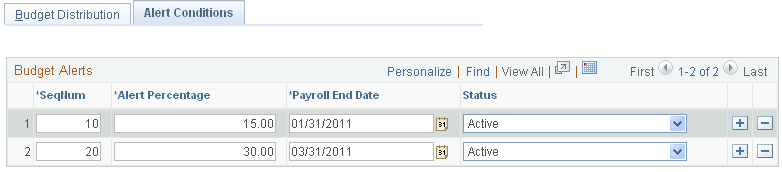
Payroll Budget Administrators can set alerts to use in the alerts report.
| Field or Control | Description |
|---|---|
|
SeqNum (sequence number) |
Assign the sequence in which you want the alerts to appear in the Alerts Report. |
|
Alert Percentage |
Enter the percentage of the reserved budget that when met or used, you want to be notified. For example, enter 30 if you want to know when 30% of the reserved budget has been used. |
|
Payroll End Date |
Enter a payroll end date to use. The payroll end date must be a date between the budget period begin and end dates. |
|
Status |
Only conditions with a status of Active will trigger alert notices. |
Budget Alerts CHN Page
Use the Budget Alerts CHN page (GPCN_BDGT_ALERT_PG) to run the budget payroll alerts report.
Navigation:
This example illustrates the fields and controls on the Budget Alerts CHN page.
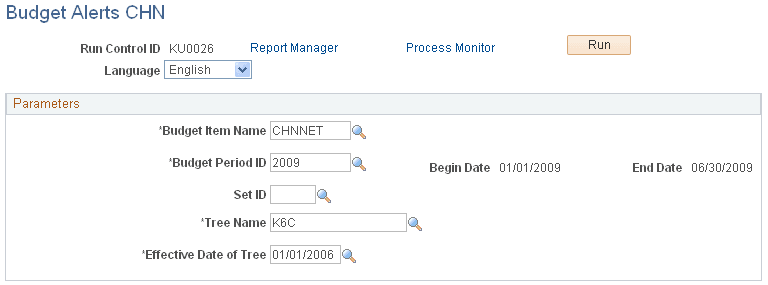
The Payroll Budget Administrator must run the Budget Alerts CHN report to monitor payroll budget alert conditions and notices.
Budget Comparison Reports CHN Page
Use the Budget Comparison Reports CHN page (GPCN_BDGT_COMP_PG) to run the budget payroll comparison report..
Navigation:
This example illustrates the fields and controls on the Budget Comparison Reports CHN page.
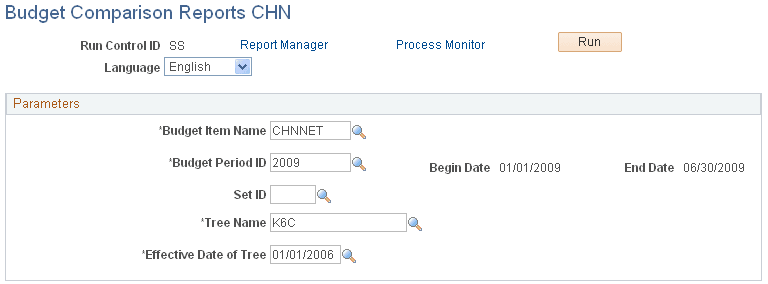
The Payroll Budget Administrator must run the Budget Comparison Reports CHN report to monitor the projected budget against the actual payroll.