Creating an Off-Cycle Group for Processing Terminated Payees
Use the pages in the Terminated Payees Group FRA component to create an off-cycle group for processing terminated payees.
Pages Used to Create an Off-Cycle Group for Processing Terminated Payees
| Page Name | Definition Name | Usage |
|---|---|---|
|
GPFR_OFFCYCLE_GRP |
Create an off-cycle group for processing terminated payees. |
|
|
GPFR_TER_EE_SEL |
Assign terminated payees to the off-cycle group. |
|
|
Chunk306979000.html#GUID-A872C9BC-649D-46A3-A211-CB6297B91660 |
GPFR_OFFCYC_CALGRP |
Create an off-cycle calendar group. |
Termination Group Page
Use the Termination Group page (GPFR_OFFCYCLE_GRP) to create an off-cycle group for processing terminated payees.
Navigation:
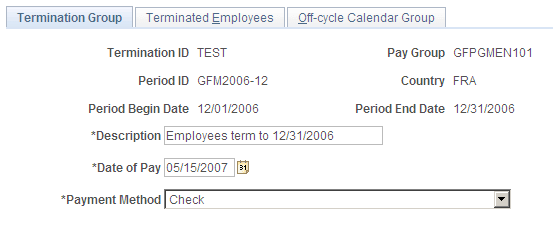
This example illustrates the fields and controls on the Termination Group page. You can find definitions for the fields and controls later on this page.
| Field or Control | Description |
|---|---|
|
Termination ID |
This field identifies of the termination group. |
| Field or Control | Description |
|---|---|
|
Pay Group |
Displays the pay group to which the terminated employees belong. |
| Field or Control | Description |
|---|---|
|
Period ID |
Displays the pay period in which the terminations are being processed. |
| Field or Control | Description |
|---|---|
|
Country |
Displays the value France. |
| Field or Control | Description |
|---|---|
|
Period Begin Date and Period End Date |
These fields display the begin and end dates of the period. |
| Field or Control | Description |
|---|---|
|
Description |
Enter a free form description of the termination group. |
| Field or Control | Description |
|---|---|
|
Date of Pay |
Defaults to the current date. The date cannot be changed to a date prior to the Period Begin Date. The payment date is applicable to all employees in the termination group. To modify the payment date for a single employee in the group, use the Global Payroll core off-cycle component. |
| Field or Control | Description |
|---|---|
|
Payment Method |
Defaults to Check. Options include: Check, Cash, (bank) Transfer, Post order, and Wire (transfer). |
Terminated Employees page
Use the Terminated Employees page (GPFR_TER_EE_SEL) to assign terminated payees to the off-cycle group.
Navigation:
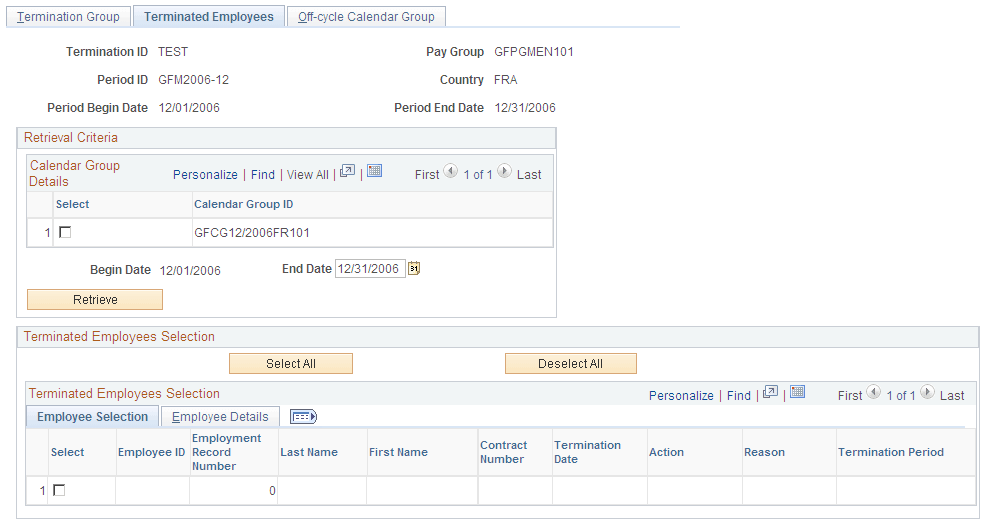
This example illustrates the fields and controls on the Terminated Employees page. You can find definitions for the fields and controls later on this page.
Calendar Group Details
| Field or Control | Description |
|---|---|
|
Calendar Group ID |
The system displays all calendar groups associated with the Period ID used to create the termination group. The displayed calendar groups are not finalized. Select the calendar group in which you want the terminated employees to be processed. |
|
Description |
The system displays a description of all calendar groups. |
|
Begin Date and End Date |
Enter an end date to define a period of time within which to retrieve terminated employees. The begin date is populated automatically and cannot be changed. The end date must be within the calculation period. |
|
Retrieve |
Click to retrieve a list of terminated employees. The process retrieves employees who meet the first two criteria and either the third or fourth criteria:
|
Terminated Employees Selection: Employee Selection
| Field or Control | Description |
|---|---|
|
Select |
By default, all employees retrieved are selected. You can manually deselect the check box of any employees who are not to be included in the termination group. You can select or deselect all employees by clicking the buttons at the top of the group box. Note: The Select check box is designed specifically for employees who have several contracts in the period. To respect the chronological order in the calculation between contracts, if two contracts are displayed on the page for the same employee/record, you cannot deselect the first contract if the second contract is selected. Contracts can be selected only in chronological order and can be deselected only in the reverse chronological order. |
|
Termination Date |
The termination date corresponds to the contract number displayed. |
|
Termination Period |
The Termination Period field indicates why an employee was selected for termination processing. The system displays Current if the employee was selected based on a segmentation trigger. The system displays Retro if the employee was selected based on a retro trigger. Payee selection based on retroactive triggers is mandatory in the case of retroactive terminations. For example: after finalizing the January payroll, the payroll department discovers that an employee was effectively terminated on January 25. The payroll administrator then enters the termination in the January calendar, producing a retroactive and a segmentation trigger with an effective date of January 25. When extracting terminated employees at the beginning of February, the payroll department specifies retrieval dates of 1 February to 15 February. If employee selection is not based on retroactive triggers, it would be impossible to retrieve the employee in this time frame. This is because the segmentation trigger is created in January, and has an effective date of January 25. As noted earler, however, the system picks up any employee with a retro trigger status other than Cancelled, regardless of the trigger effective date. In other words, it is possible for employees terminated retroactively to be selected even though their termination dates are not included within the retrieval Begin and End dates. |
Note:
A terminated group cannot be saved if no employee is selected. This situation can occur if you deselect All Employees or if the retrieval process finds no terminated employee corresponding to extraction criteria.
Terminated Employees Selection: Employee Details
| Field or Control | Description |
|---|---|
|
Payment Method |
This field is populated with the default payment method specified on the Termination Group page. You can override the default payment method for individual employees. |
Understanding Banking Setup
To set up banking, you must use core PeopleSoft Global Payroll pages. The setup involves:
-
Setting up basic bank information using the Bank Table page.
-
Setting up bank branch information using the Branch Table page.
-
Setting up source bank account information using the Source Bank Accounts page.
-
Linking the source bank ID to a pay entity using the Source Bank Link page.
-
Entering bank account information for payees using the Bank Account Information page.