Generating Year End Reports
This section discusses how to generate year end reports.
Pages Used to Generate Year End Reports
| Page Name | Definition Name | Usage |
|---|---|---|
|
GPIN_PR_RC |
Use to generate forms 3A, 5, 6, 12BA, 16, and 24. |
|
|
GPIN_FORM7_RC |
Use to generate form 6 half-year report of consolidated employer and employee insurance contributions. |
|
|
GPIN_24Q_RC |
Use to generate Form 24Q and related tax files for electronic submission. |
Create Year End Reports IND Page
Use the Create Year End Reports IND page (GPIN_PR_RC) to use to generate forms 3A, 5, 6, 12BA, 16, and 24.
Navigation:
This example illustrates the fields and controls on the Create Year End Reports IND page. You can find definitions for the fields and controls later on this page.
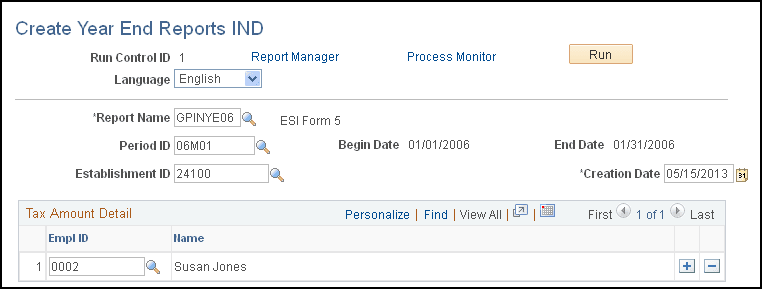
| Field or Control | Description |
|---|---|
|
Report Name |
Select the report name. Define report names on the Report Setup page. |
|
Period ID |
Select the appropriate period ID. The begin date and end date appear as soon as you select the period ID. |
|
Payee Sort Option |
Select a sort order for the report. Options are:
Note: This field is available only when you select the following reports: Form 16, Form 3A, and Form 6A. |
|
Establishment ID |
Select an establishment ID only if you are running the Form 5 report. |
Print ESI Form 6 Page
Use the Print ESI Form 6 IND page (GPIN_FORM7_RC) to use to generate form 6 half-year report of consolidated employer and employee insurance contributions.
Navigation:
This example illustrates the fields and controls on the Print ESI Form 6 IND page. You can find definitions for the fields and controls later on this page.
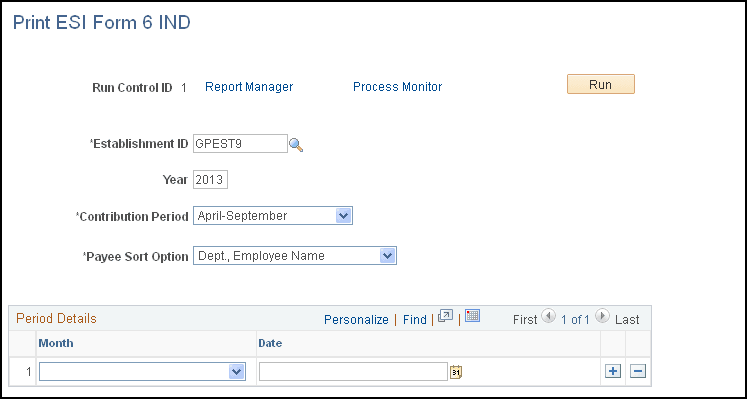
| Field or Control | Description |
|---|---|
|
Year |
Enter the fiscal year of the report period. |
|
Contribution Period |
Select the six-month period covering the social insurance contributions. |
| Field or Control | Description |
|---|---|
|
ESI Challan Number |
Enter the challan numbers with which the social insurance payments were made. |
Print Form 24Q IND Page
Use the Print Form 24Q IND page (GPIN_24Q_RC) to use to generate Form 24Q and related tax files for electronic submission.
Navigation:
This example illustrates the fields and controls on the Print Form 24Q IND page. You can find definitions for the fields and controls later on this page.
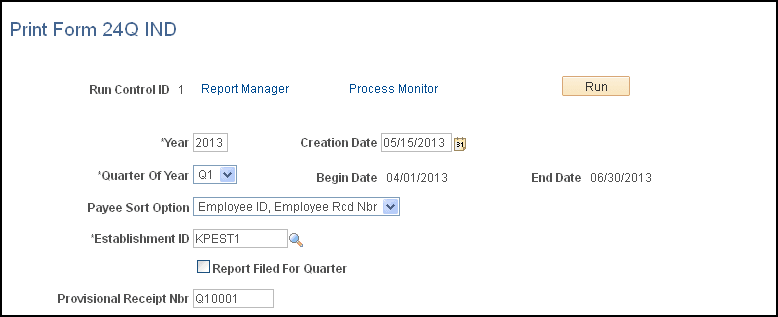
| Field or Control | Description |
|---|---|
|
Payee Sort Option |
Select a method to display employee information. Available options are Employee ID, Employee Rcd Nbr (employee record number) and Name, Employee Rcd Nbr. |
|
Report Filed for Quarter |
Select the Report Filed for Quarter check box if the answer to the question listed in the column 1 (e) of the Form 24Q is Yes. The question listed in the column 1 (e) is this: Has any statement been filed earlier for this quarter (Yes/No)? |
|
Provisional Receipt Nbr. (provisional receipt number) |
Enter the provisional receipt number that is available in Form 24Q, column 1 (f), if the answer to the column 1 (e) question is Yes. |