Defining Multiple Information Report Parameters
To define multiple information report parameters, use the Multiple Info Parameters MEX (GPMX_ANNL) component.
Page Used to Define Multiple Information Report Parameters
| Page Name | Definition Name | Usage |
|---|---|---|
|
GPMX_ANNL |
Define multiple information report parameters for a company. |
Understanding the Multiple Information Report Setup
Starting on January 1, 2004, there is a new statutory requirement to submit the Multiple Information report to the government. With Global Payroll for Mexico, you can comply with this new legal requirement
To create the Multiple Information report:
-
Define Multiple Information report parameters on the Multiple Info Parameters MEX page.
Before you can generate the Multiple Information report, you need to map corresponding values representing the fields on the report to the payroll elements in Global Payroll for Mexico. You'll map the elements on the Multiple Info Parameters MEX page.
-
Run the Multiple Information report on the Multiple Information MEX page.
You will generate the Multiple Information report at the end of the year, after having finished the payroll fiscal year. The output will be a flat file that will be loaded up to the SAT (Servicio de Administracíon Tributaria) system.
Note:
The Multiple Information report page is discussed in another topic.
See Running Tax Reports.
Multiple Info. Parameters MEX Page
Use the Multiple Info. Parameters MEX page (GPMX_ANNL) to define multiple information report parameters for a company.
Navigation:
This example illustrates the fields and controls on the Multiple Info. Parameters MEX page. You can find definitions for the fields and controls later on this page.
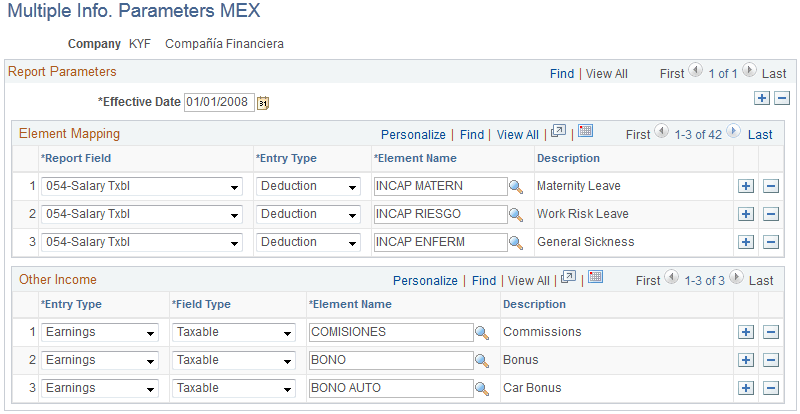
Element Mapping
| Field or Control | Description |
|---|---|
|
Report Field |
Select the field on the Multiple Information report to which the element will be mapped. |
|
Entry Type |
Define the entry type for the element. Values are Accumulator, Deduction, and Earnings. |
|
Element Name |
Select the element which will map to the Multiple Information report. |
Other Income
Other Income field values are for any other earnings or deduction that don't have a specific row defined in the Element Mapping section.
| Field or Control | Description |
|---|---|
|
Entry Type |
Define the entry type for the element. Values are Deduction and Earnings. |
|
Field Type |
Select Taxable or NonTaxable for the earnings or deduction entry type. |
|
Element Name |
Select the element which will map to the Multiple Information report. |