Defining Messages on Payslips
To set up payslip messages, use the Payslip Message by Pay Group GBR component (GPGB_PSLIP_PGRP_M). This topic discusses how to define messages on payslips.
Pages Used to Include Messages on Payslips
| Page Name | Definition Name | Usage |
|---|---|---|
|
GPGB_MESS_GRP |
Define messages on the payslips for all employees who belong to a specific pay group. |
|
|
GPGB_MESS_EE |
Define messages on the payslip for a specific employee. |
Add Payslip Messages GBR Page
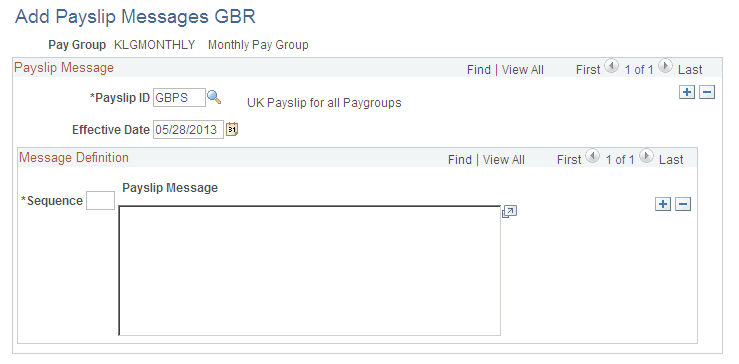
Use the Add Payslip Messages GBR page (GPGB_MESS_GRP) to define messages on the payslips for all employees who belong to a specific pay group.
Navigation:
This example illustrates the fields and controls on the Add Payslip Messages GBR page.
Note:
The Effective Date field displays all the messages for an employee or a pay group where the effective date is within the segment.
| Field or Control | Description |
|---|---|
|
Payslip ID |
Select the payslip. You must have defined a payslip first. |
|
Sequence |
Enter the order in which you want to display your messages. |
|
Payslip Message |
Enter the message that you want to display on the payslip. The message will be sent to all employees who belong to the pay group that you specified. |
Create Messages GBR Page
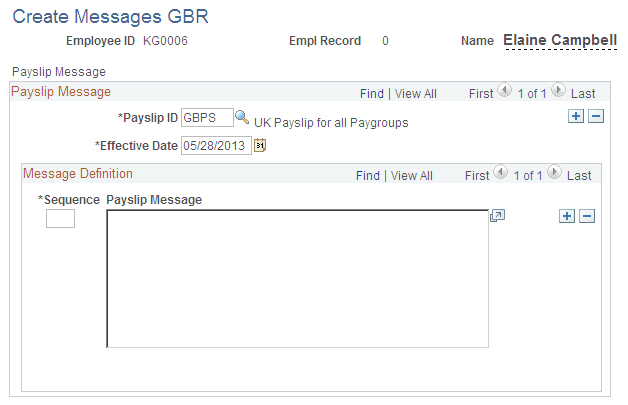
Use the Create Messages GBR page (GPGB_MESS_EE) to define messages on the payslip for a specific employee.
Navigation:
This example illustrates the fields and controls on the Create Messages GBR page.
Note:
The Effective Date field displays all the messages for an employee or a pay group where the effective date is within the segment.
| Field or Control | Description |
|---|---|
|
Payslip ID |
Select the payslip that you require. |
|
Sequence |
Enter the sequence in which you want to display your messages. |
|
Payslip Message |
Enter the message that you want to display on the payslip. The message will be sent only to the employee that you specify. |