Running the UK Banking Processes
This topic provides an overview of the UK banking processes and discusses how to create a file for BACS transmission.
Pages Used to Run the UK Banking Processes
| Page Name | Definition Name | Usage |
|---|---|---|
|
Run Payment Prep Process GBR Page |
GPGB_PAYMENT |
Run the GP UK Banking Application Engine process (GPGB_PAYMENT) that populates the GPGB_PAYMENT table. Run this process after running the core banking process. |
|
GPGB_BANK_EFT |
Run the Create the EFT File SQR process (GPGBEFT). This process creates a fixed-length ASCII file that can be used as input to BACS processing software. The system displays as valid values only those calendar run IDs that have had the banking finalize step run. |
Understanding the UK Banking Processes
When you have finalized a pay run, run the Global Payroll core banking process. This banking process has two steps: calculate and finalize. Run the calculate step any number of times, but the finalize step only once. You can use the Review Payment by Calendar Group page to view net pay and deduction recipient banking transactions before you run the UK banking process.
When you have run the core banking process, run these processes provided in Global Payroll for the UK:
-
Banking process GBR.
This process populates a UK-specific table, GPGB_PAYMENT, that contains basic calendar run information and the transaction and bank data necessary to create a file for BACS-processing software. View the results of this process using the Review Payments by Cal Group component
-
Create BACS File process.
This process transfers the data from GPGB_PAYMENT, for a given calendar run ID, into a fixed-length file on disk suitable for BACS transmission.
Note:
The process does not write negative values to the BACS file. It reports any negative values in the process log file.
Prerequisites
Before you can run the UK banking process, you must run the core Global Payroll Application Engine process (GP_PMT_PREP).
Related Topics
Create BACS File GBR Page
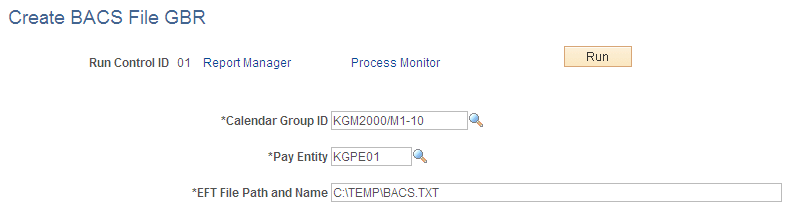
Use the Create BACS File GBR page (GPGB_BANK_EFT) to run the Create the EFT File SQR process (GPGBEFT).
This process creates a fixed-length ASCII file that can be used as input to BACS processing software. The system displays as valid values only those calendar run IDs that have had the banking finalize step run.
Navigation:
This example illustrates the fields and controls on the Create BACS File GBR page.
| Field or Control | Description |
|---|---|
|
EFT File Path and Name (electronic file transfer file path and name) |
Enter the path and file name for location of the EFT file that you want to create. |
Related Topics