Maintaining Company Tax Information
To maintain company tax information, use the Company Federal Tax Data USA (GPUS_FWT_ER) and Company State Tax USA (GPUS_CO_STATE_TAX) components.
Pages Used to Maintain Company Tax Information
| Page Name | Definition Name | Usage |
|---|---|---|
|
GPUS_FWT_ER |
Define company-level federal tax information. |
|
|
GPUS_CO_STATE_TAX |
Define company-level state tax information. |
Company Federal Tax Data USA Page
Use the Company Federal Tax Data USA page (GPUS_FWT_ER) to define company-level federal tax information.
Navigation:
This example illustrates the fields and controls on the Company Federal Tax Data USA page.
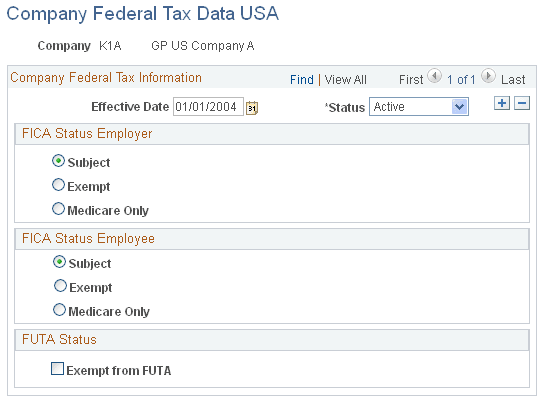
FICA Status Employer
Select whether the company is subject to OASDI and Medicare taxes.
| Field or Control | Description |
|---|---|
|
Subject |
Select for companies subject to both OASDI and Medicare taxes. This is the default option. |
|
Exempt |
Select for companies exempt from OASDI and Medicare taxes. |
|
Medicare Only |
Select for companies subject to Medicare taxes only. |
FICA Status Employee
Select the default FICA status for the payees of the company. You can override the FICA status of individual payees on the Maintain Tax Profile USA page.
See Maintain Tax Profile USA Page.
| Field or Control | Description |
|---|---|
|
Subject |
Select to designate payees as subject to both OASDI and Medicare taxes. This is the default option. |
|
Exempt |
Select to designate payees as exempt from OASDI and Medicare taxes. |
|
Medicare Only |
Select to designate payees as subject to Medicare taxes only. |
FUTA Status
Select whether the company is exempt from FUTA. By default, all companies are not exempt.
Note:
The system sets the default FUTA status for a payee for the initial hire row only.
Company State Tax Data USA Page
Use the Company State Tax Data USA page (GPUS_CO_STATE_TAX) to define company-level state tax information.
Navigation:
This example illustrates the fields and controls on the Company State Tax Data USA page.
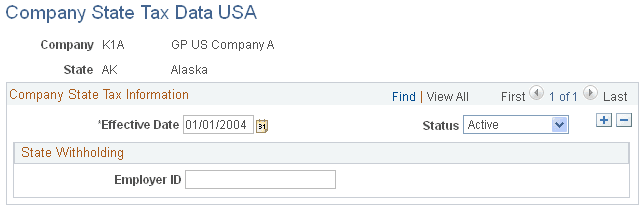
Enter the employer identification number (EIN) that the company uses to report and pay SWT.