Defining the Absence Analytics Dashboard Content and Layout
Pages Used to Define the Absence Analytics Dashboard Content and Layout
| Page Name | Definition Name | Usage |
|---|---|---|
|
PORTAL_HPCOMP |
Specify which pagelets appear on the Absence Analytics Dashboard. |
|
|
PORTAL_HPLAYOUT |
Define the layout of the pagelets on the Absence Analytics Dashboard. |
Personalize Content: Absence Analytics Dashboard Page
Use the Personalize Content: Absence Analytics Dashboard page (PORTAL_HPCOMP) to specify which pagelets appear on the Absence Analytics Dashboard.
Navigation:
Click the Content link on the Absence Analytics Dashboard page.
This example illustrates the fields and controls on the Personalize Content: Absence Analytics Dashboard page.
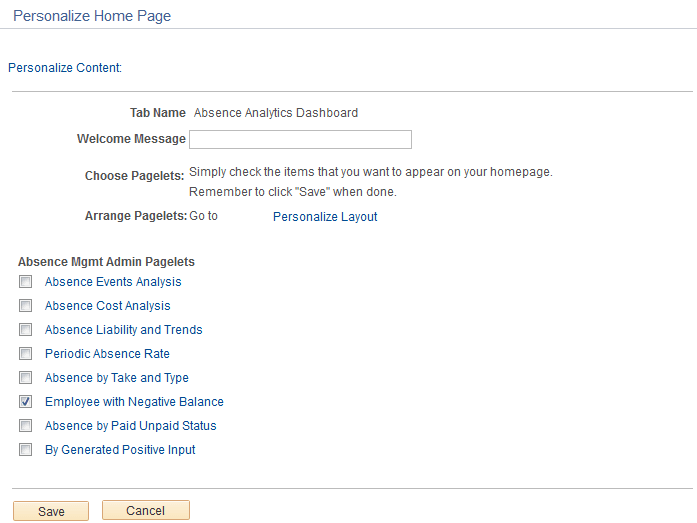
Use this page to choose which pagelets you want to display in your Learning Home.
| Field or Control | Description |
|---|---|
|
Personalize Layout |
Click to access the Defining the Absence Analytics Dashboard Content and Layout. |
|
<pagelet name> |
Click a pagelet name link to see a preview of the pagelet. |
Personalize Layout: Absence Analytics Dashboard Page
Use the Personalize Layout: Absence Analytics Dashboard page (PORTAL_HPLAYOUT) to specify which pagelets appear on the Absence Analytics Dashboard.
Navigation:
Click the Layout link on the Absence Analytics Dashboard page.
This example illustrates the fields and controls on the Personalize Layout: Absence Analytics Dashboard page.
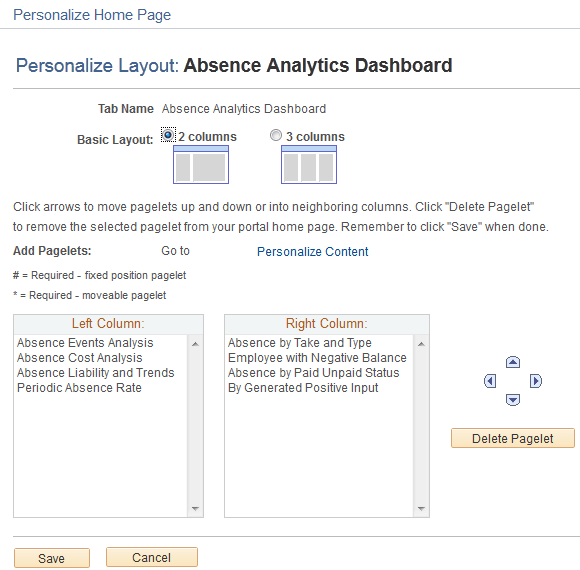
Use this page to define the arrangement of the pagelets in your Learning Home.
| Field or Control | Description |
|---|---|
|
Personalize Content |
Click to access the Personalize Content: Absence Analytics Dashboard Page. |