Generate Positive Input Sections
Generate positive input sections trigger creation of positive input—earning or deduction data, such as meal or travel allowances, that applies to one pay period and is payee-specific. Positive input is generated in one pay run and resolved in another. When the Process List Manager encounters a generate positive input section during source calendar processing, it creates rows of positive input that can be resolved and paid when you process the target calendar. The source and target calendars can be associated with the same or different pay periods or calendar group IDs.
Say your organization gives payees a meal allowance when they work four or more hours a day. Rather than using the Positive Input page to enter expenses manually, you can have the system generate positive input based on a formula that you define.
Note:
Positive input can also be entered manually or received from other applications.
Rules for Generate Positive Input Sections
These are the rules for generate positive input sections:
-
You can generate positive input only for earning and deduction elements that are defined with one of these calculation rules:
Base × Percent
Unit × Rate
Unit × Rate × Percent
-
Before positive input can be generated, at least one auto-assign component—base, percent, rate, or unit—of the earning or deduction element needs resolving.
When the Process List Manager reaches the generate positive input section during the batch process, it calls the Generate Positive Input program for the first element, to determine whether any of its components are populated. If one is populated, the system creates a row of positive input for the target calendar; if none is populated, the Process List Manager continues to the next element in the section.
-
Because positive input is generated in source calendar processing and resolved in target calendar processing, you must create the source and target calendars before running the payroll or absence process for the source calendar.
-
The system checks element eligibility while processing the target calendar, not while processing the source calendar that generates positive input.
When checking element eligibility, the system ensures that:
-
The element has been assigned to the payee through the Eligibility Group
-
The element doesn't appear on the Elements to be Excluded grid on the Calendars - Excluded Elements page
-
There are no Do Not Process instructions for the element on the Positive Input page or the Positive Input - Calendar page.
-
-
Generation control and eligibility group changes can affect positive input resolution.
Say the system generates positive input for a payee during June payroll. If the target calendar is July and the payee is no longer eligible in July, the positive input may or may not be resolved based on the Allow Eligibility Override Using PI check box setting on the paying entity setup.
-
When segmentation occurs, generate positive input sections are segmented based on the begin and end dates of the source calendar, not the target calendar.
If the source calendar is segmented, the Process List Manager calls the Generate Positive Input program only once in a segment. The generated positive input is assigned to the target calendar, based on the target calendar's end date.
-
When element segmentation occurs, the system creates a separate instance of positive input for each slice.
The rate as of date associated with each slice corresponds to the slice end date, not the segment end date.
Generate Positive Input Section Example
Your organization's policy is to pay a daily meal allowance to payees who work four or more hours in a day, and you've created an earning element called Meal_Allow_Earn, with a calculation rule of Unit × Rate.
This example shows how your process list might be defined (the generate positive input section is the last in the process list).
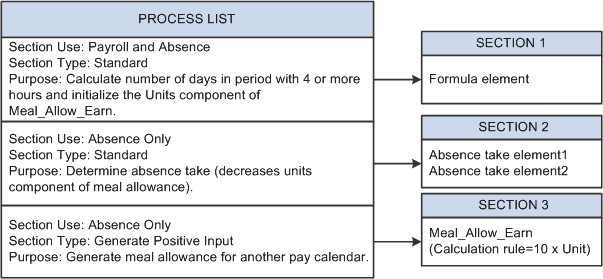
The system resolves the formula element in section 1, initializing the units component of Meal_Allow_Earn with the number of days in the period when the payee is scheduled to work four or more hours. The system moves to section 2, where it resolves the absence take elements, thereby decreasing the meal allowance units by the number of days that the payee was absent on days the payee was scheduled to work four or more hours. Assume that the units component resolves to 1 (day)—the payee was scheduled to work five hours and did so. Finally the system reaches section 3, the generate positive input section, containing the meal allowance earning element. Because the units component of the earning element was populated in sections 1 and 2, the system generates a row of positive input as listed in the following table:
| Element | Rate Component (Meal_Allow_Earn_Rate) | Units Component (Meal_Allow_Earn_Unit) |
|---|---|---|
|
Meal_Allow_Earn |
10 |
1 |
Nothing happens to the data row until you run the payroll process for the target calendar. The system then checks for eligibility, and assuming that the payee still qualifies for a meal allowance, resolves the positive input by calculating 10 × 1.