Running the Reconciliation Process
Page Used to Run the Reconciliation Process
| Page Name | Definition Name | Usage |
|---|---|---|
|
GP_BNK_RCN_RC |
Enter processing instructions for the bank reconciliation process. |
Run Payment Reconciliation Page
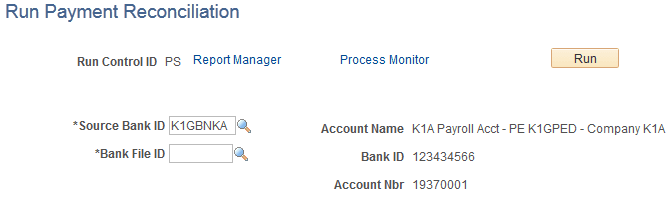
Use the Run Payment Reconciliation page (GP_BNK_RCN_RC) to enter processing instructions for the bank reconciliation process.
Navigation:
This example illustrates the fields and controls on the Run Payment Reconciliation page.
| Field or Control | Description |
|---|---|
|
Source Bank ID |
Select the Source Bank ID in which to run the reconciliation. This is a required field. The process looks at all unreconciled transactions in the system for the selected source bank ID and attempts to match them based on payment number, payment type, and payment amount. Transactions not meeting the criteria are marked as exceptions. |
|
Bank File ID |
Select the Bank File ID in which to run the reconciliation. This is a required field. |
Note:
If the payment reconciliation process runs multiple times against a given bank file, each time the process will reset the reconciliation status back to Unreconciled for bank transactions not previously reconciled.