Canceling or Correcting a Personnel Action Request Using Fluid
An HR user can correct or cancel a PAR request using the fluid user interface. This section describes how to correct/cancel a PAR request.
Only users with the following user roles may perform a correction or cancellation:
-
For PAR Correction — Federal PAR Correction User
-
For PAR Cancellation — Federal PAR Cancellation User
To access a processed request that you want to correct/cancel:
-
Click the Personnel Actions USF' tile.
-
Access the Personnel Actions USF page of the employee.
-
Click the Related Actions button in 'Actions' field.
-
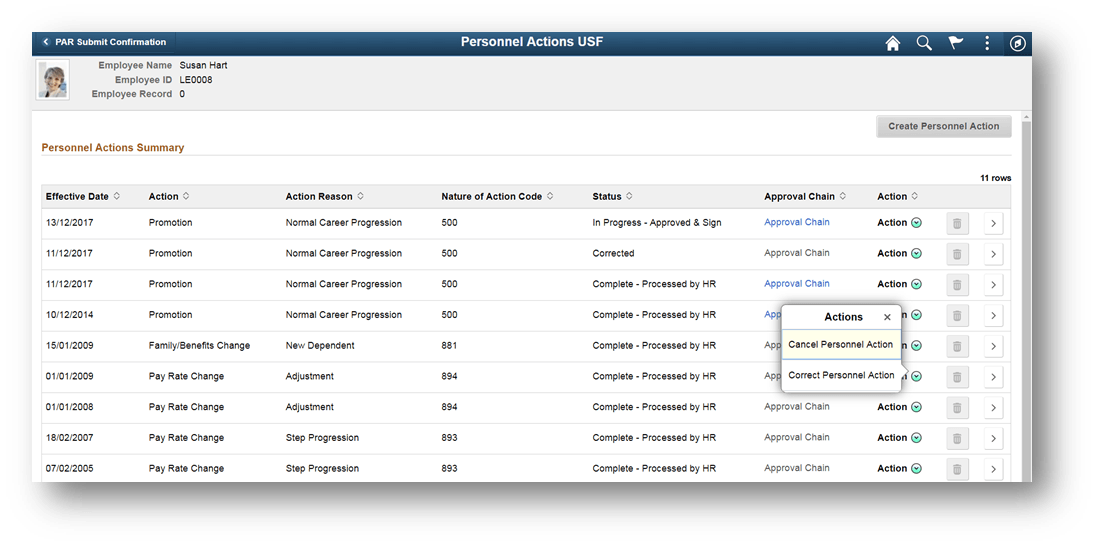
Select Cancel Personnel Action or Correct Personnel Action based on your requirement.
This example illustrates Personnel Actions USF page when Actions button is selected
Note:
Only processed rows are available for correction or cancellation. When a correction is in progress another correction cannot be made on the same personnel action row. The related action button for such PAR rows show "No actions available" message.
For more information on the fields and controls in Personnel Actions USF page, see Personnel Action Request Page