Modify Person Tile
Administrators use the Modify Person tile to update a Person Data record.
Note:
The following must be in place to see and access this tile and pages:
(Commercial users)
--The Fluid Person and Manage Relationship check box must be enabled on the Person and Job Installation - Person and Organization Page.
--Commercial users must be assigned the HR Admin Modify Person role.
(USF users)
--The Fluid Person check box must be enabled on the Person Installation USF Page.
--Federal users must be assigned the Federal Admin Modify Person role.
Navigation:
The Modify Person tile is delivered as part of the fluid Manage Human Resources Dashboard for commercial users.
(USF) Federal users can add the tile to a homepage using Personalize Homepage.
This example illustrates the Add Person tile
Select this tile to begin the process to modify an existing Person record using fluid.
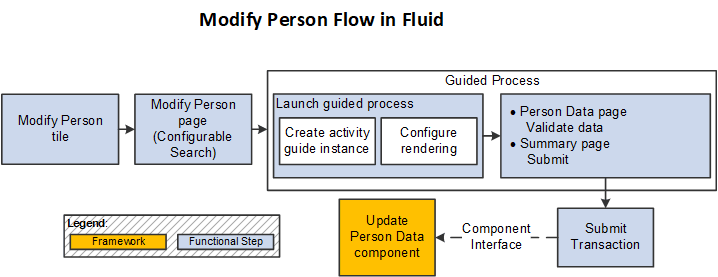
Modify Person Flow in Fluid
Use the following steps to perform the fluid-based approach to quickly update a Person record:
This diagram shows the high-level functional pages and steps to modify a person using the fluid pages.
-
Select the Modify Person Tile to begin the process ( or from the homepage to which you added the tile).
Note:
Users can also access the search/match pages and select the Edit button for an existing person in the Potential duplicates grid to directly access the Modify Person pages.
-
Use the configurable search page to find a person record (see Application Fundamentals: Setting Up Search Configuration).
-
Select a person to continue to the Modify Person activity guide process.
There are two steps in this activity guide:
-
The Person Data Page to update person details.
-
The Modify Person - Summary page (see Add Person - Summary Page) to review the data.
Note:
The Modify Person activity guide uses the same pages as the ones for the Add Person activity guide, with the exception of the CheckList section. For page and field definitions, see the (Fluid) Adding a Person documentation.
-
-
Submit the information to update the Person Data record.
Note:
The Modify Person process does not use Approvals.
See also Fluid Add or Modify Persons, Create Organizational Relationships, and Manage Job Data Architectures.