OnBoarding Manager Activity Tile
Use the OnBoarding Manager Activity tile to access the OnBoarding Activities page as a manager to view your OnBoarding employees for whom you have tasks.
Note:
Managers must be assigned the OnBoarding Manager User role to view and access this tile.
Navigation:
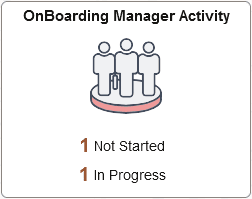
This example illustrates the fields and controls on the OnBoarding Manager Activity tile.
Note:
You must always start the OnBoarding activity guide from the delivered OnBoarding Manager Activity Tile. The creation of the activity guide instance includes special processing that is mandatory for OnBoarding.
The SetMgrPageContent(); method manages the live data on the tile, and is called from HR_OBD_TILE_CTN_FL.Activate.
If you have employees that are assigned a multi-participant OnBoarding process and you are the manager participant, the tile may show any of the following status counts:
-
Not Started: Displays the number of activity guides that have not been started by either you or the employee. If either you or the employee has accessed the OnBoarding process, the status will change to In Progress.
-
In Progress: Displays the number of activity guide that have been accessed by either you or the employee.
Select the tile to access the OnBoarding Activities Page (for Managers) to view your OnBoarding employees and their process status.