Working with OnBoarding Templates
The Activity Guide Composer uses fluid pages to create templates that identify the steps a user should take to perform a transaction or process. You will use the Activity Guide Composer - Templates component to define the activity guide layout, assign a category, identify the security roles that can access the OnBoarding templates and activity guides, identify actions the user can take, and identify the steps that a new employee would need to complete during the OnBoarding process.
Delivered OnBoarding Templates and Steps
All delivered templates use the vertical non-sequential layout that has the navigation steps appear in the left panel of the page.
The following table lists the delivered, ready to use, OnBoarding activity guide templates and their corresponding page steps:
| Template | List of Page Steps |
|---|---|
|
OBDPRBD – Standard PreBoarding |
See also Understanding the Delivered Standard PreBoarding Activity Guide Steps. |
|
OBDSTND – Standard OnBoarding |
See also Understanding the Delivered Standard OnBoarding Activity Guide Steps. |
|
OBDMULT – Standard Multi-Participant OnBoarding |
Available to the employee:
Available to the manager:
See also Understanding the Delivered Standard Multi-Participant OnBoarding Activity Guide Steps. |
|
OBDCAN1 – OnBoarding for CAN |
See also (CAN) Understanding the Delivered OnBoarding for Canada Activity Guide Steps. |
|
OBDUSA1 – OnBoarding for USA |
See also (USA) Understanding the Delivered OnBoarding for USA Activity Guide Steps. |
Considerations for Configuring Templates with PreBoarding and OnBoarding Steps
The following are guidelines for the template configuration based on the organization’s scenario:
| Processing Scenario | Category/Template Requirements |
|---|---|
|
All steps can be completed during either the PreBoarding or OnBoarding phase. |
|
|
Some steps should be completed during the OnBoarding-only phase. All others can be completed at any time. |
|
|
Some steps should be completed during the PreBoarding-only phase. All others can be completed at any time. |
|
|
Some steps should be completed during the PreBoarding-only phase and some should be completed during the OnBoarding-only phase. |
|
The PeopleSoft HCM system delivers the OBDPRBD template as an activity guide that supports both PreBoarding and OnBoarding phases. When using this activity guide template, a person accessing the activity guide process prior to the first day of employment will see those steps that are marked for PreBoarding-only as well as those that have no designation. On the first day of employment and after, the person will see those steps marked as OnBoarding-only and those without any designation. If the person did not complete a required PreBoarding-only step it will also appear.
Important:
You must always start the OnBoarding activity guides from the delivered OnBoarding Activities Tile (for Employees). The creation of the activity guide instance includes special processing that is mandatory for the successful transition between the PreBoarding and OnBoarding phases.
Setting Up Templates for Multi-Participant Users
The PeopleSoft application delivers the OBDMULT (Standard Multi-Participant OnBoarding) template, which provides tasks for the employee as well as tasks for the manager to complete for the employee's OnBoarding process. This template is already configured with the following.
-
The Enterprise Components: Activity Guide Composer - Security Page includes the following roles:
-
Administrator: OnBoarding Administrator
-
End User: OnBoarding Employee
-
End User: OnBoarding Manager User
Note:
The End User roles for the employee and manager user should match the Employee Role and Manager Role defined on the OnBoarding Installation Page.
-
-
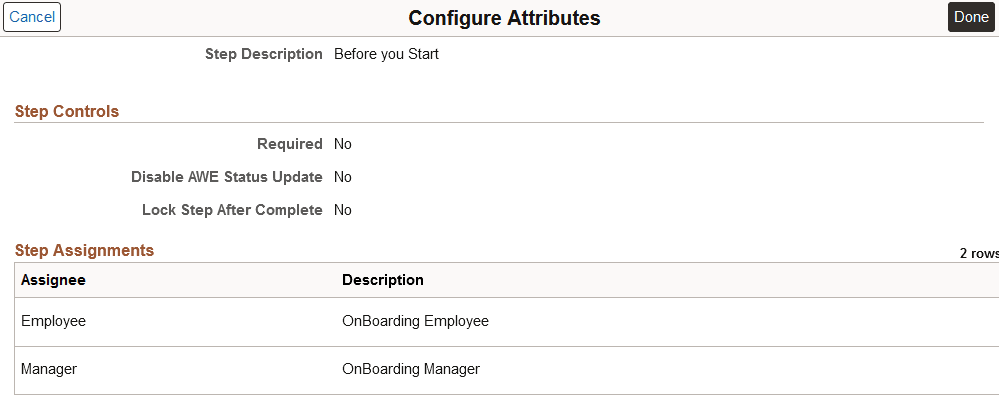
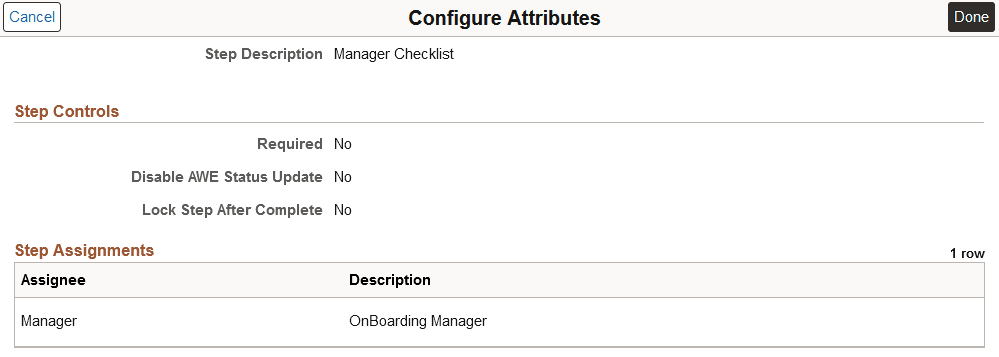
The Enterprise Components: Configure Attributes Page includes the OnBoarding Manager assignees for the following steps:
-
Before you Start
This example illustrates the Assignees for the Before you Start step on the OBDMULT template.
-
Manager Checklist
This example illustrates the Assignees for the Manager Checklist step on the OBDMULT template.
Note:
For the delivered OBDMULT template, the Hide Steps option is selected to hide steps for a user when not assigned to him or her. With this option selected, users will only see the steps for which they need to take action.
-
You will need to perform the following additional tasks for templates that use multi-participants:
Related Topics