Setting Up and Managing Data Extraction for Forms 1094-C and 1095-C
This section provides an overview of the set up tables for data extraction required by Forms 1094-C and 1095-C.
Pages Used to Set Up and Manage Data Extraction
| Page Name | Definition Name | Usage |
|---|---|---|
|
HEALTH_PLAN_TABLE |
Define ACA health plan attributes needed in forms, e.g. Self-Insured, Minimum Essential Coverage, and Lowest Cost Monthly Premium. |
|
|
ACA_EMP_ELIG_GP |
Group different ACA eligibility statuses into eligibility groupings for use in the data extraction processes. |
|
|
ACA_CODE_SERIES1 |
Define eligible coverage codes for Code Series 1 and indicate whether to Report Employee Share of Lowest Cost for Self-only. |
|
|
ACA_DATEXTR_DEF |
Define a set of data extraction rules. |
|
|
ACA_DATA_SOURCE |
Define other data sources to be used in Excel-CI Load. |
Health Plan Table Page
Use the Health Plan Table page (HEALTH_PLAN_TABLE) to enter the ACA plan details.
Navigation:
This example illustrates the fields and controls on the Health Plan Table page.
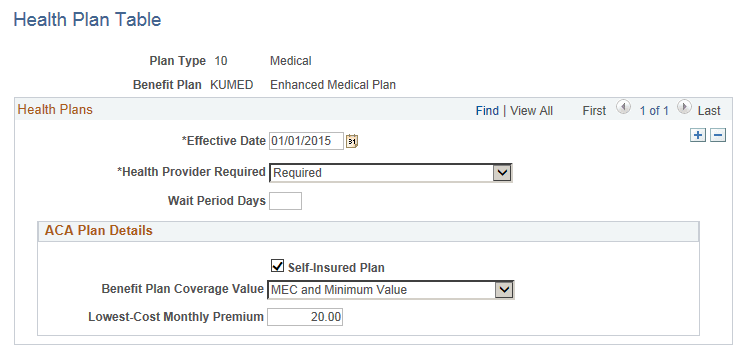
| Field or Control | Description |
|---|---|
|
Health Provider Required |
Select whether an employee must declare a health provider when enrolling in this plan through self-service. |
|
Wait Period Days |
Enter the number of days an employee must wait to be eligible for the plan. |
|
Self-Insured Plan |
Select this check box if the health plan is employer-sponsored self-insured health coverage. |
|
Benefit Plan Coverage Value |
Options include MEC and Minimum Value, MEC and Not Minimum Value, and Not Minimum Essential Coverage. |
|
Lowest-Cost Monthly premium |
This cost is the employee share of the lowest-cost monthly premium for self-only minimum essential coverage providing minimum value that is offered to the employee. (This field is only used for employees using the Base Benefits product.) |
ACA Employee Eligibility Group Page
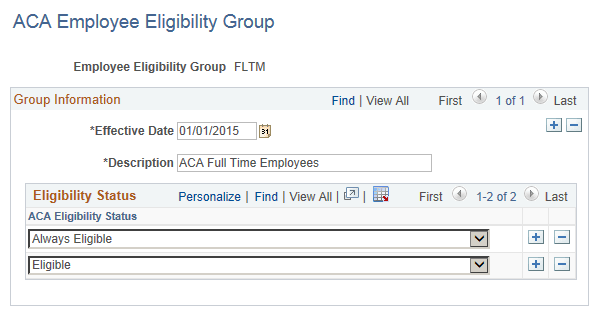
Use the ACA Employee Eligibility Group page (ACA_EMP_ELIG_GP) to group different ACA eligibility statuses into eligibility groupings for use in the data extraction process. This is a system-delivered table and includes the FLTM (Full Time) and NFLT (Not Full Time) eligibility groups.
Navigation:
This example illustrates the fields and controls on the ACA Employee Eligibility Group page.
| Field or Control | Description |
|---|---|
|
Employee Eligibility Group |
Displays the name of the eligibility group. FLTM (Full Time) and NFLT (Not Full Time) are eligibility groups delivered with the system. |
|
ACA Eligibility Status |
Status: Eligible and Always Eligible are assigned to FLTM. Ineligible, To be determined, and Excluded are assigned to NFLT. |
ACA Offer of Coverage Page
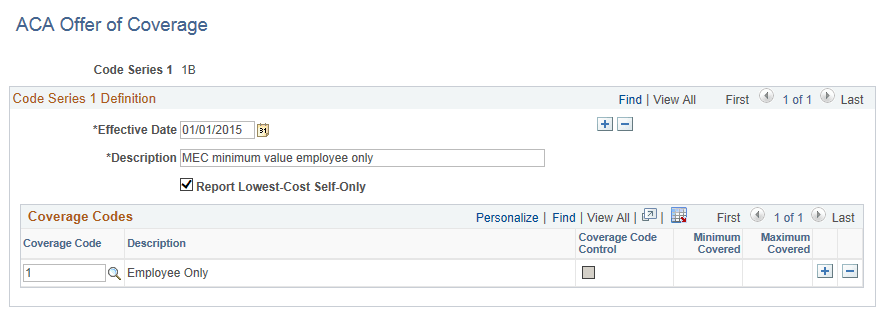
Use the ACA Offer of Coverage page (ACA_CODE_SERIES1) to define eligible coverage codes and whether to Report Lowest Cost Self-only per Code Series 1 as defined in the IRS Instructions for Forms 1094-C and 1095-C. You do not need to define these rules as this is delivered as system data. However, you can add other coverage codes as required.
Navigation:
This example illustrates the fields and controls on the ACA Offer of Coverage page.
| Field or Control | Description |
|---|---|
|
Code Series 1 |
Employee Offer of Coverage Codes (Code Series 1) published in IRS Instructions for 1095-C. The valid codes are 1A – 1I for tax year 2015. |
|
Report Lowest-Cost Self-Only |
Select this check box to indicate that Employee Share of Lowest Cost Monthly Premium is reported for the Code Series 1. For example, if code 1B, 1C, 1D, or 1E is reported on line 14 of Form 1095-C, the lowest self-only cost will be reported on line 15 of Form 1095-C. For this reason, for codes 1B, 1C, 1D, and 1E, the checkbox is selected. |
|
Coverage Code |
List coverage codes that are associated with certain Code Series 1 (e.g. 1B, 1C, 1D, or 1E). |
ACA Data Extract Definition Page
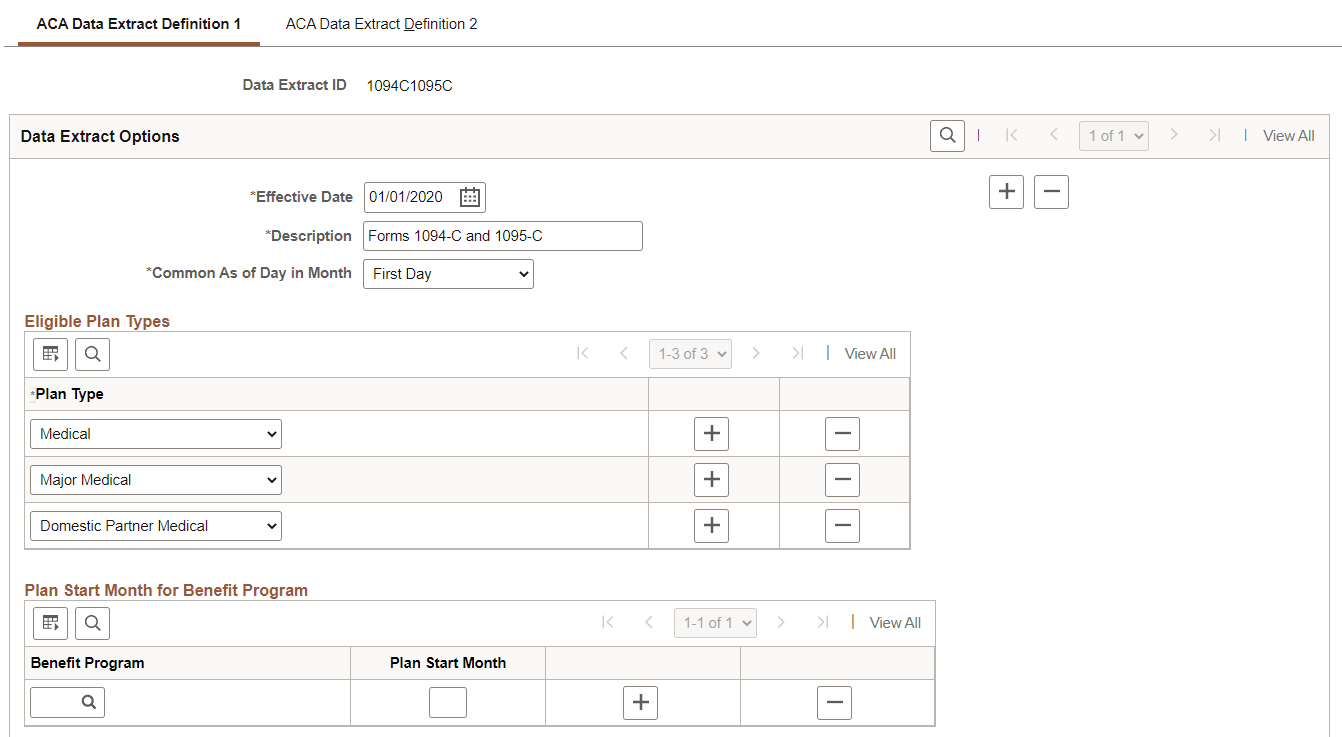
Use the ACA Data Extract Definition page (ACA_DATEXTR_DEF) to define a set of data extraction rules. Each set of data extraction rules has a corresponding ACA Data Extract ID.
ACA Data Extract ID 1094C1095C is delivered as system data and is defined to extract data required for generating the Form 1094-C and Form 1095-C transmittal file and for issuing employee Form 1095-C.
Navigation:
This example illustrates the fields and controls on the ACA Data Extract Definition 1 page (Page 1 of 3).
This example illustrates the fields and controls on the ACA Data Extract Definition 1 page (Page 2 of 3).
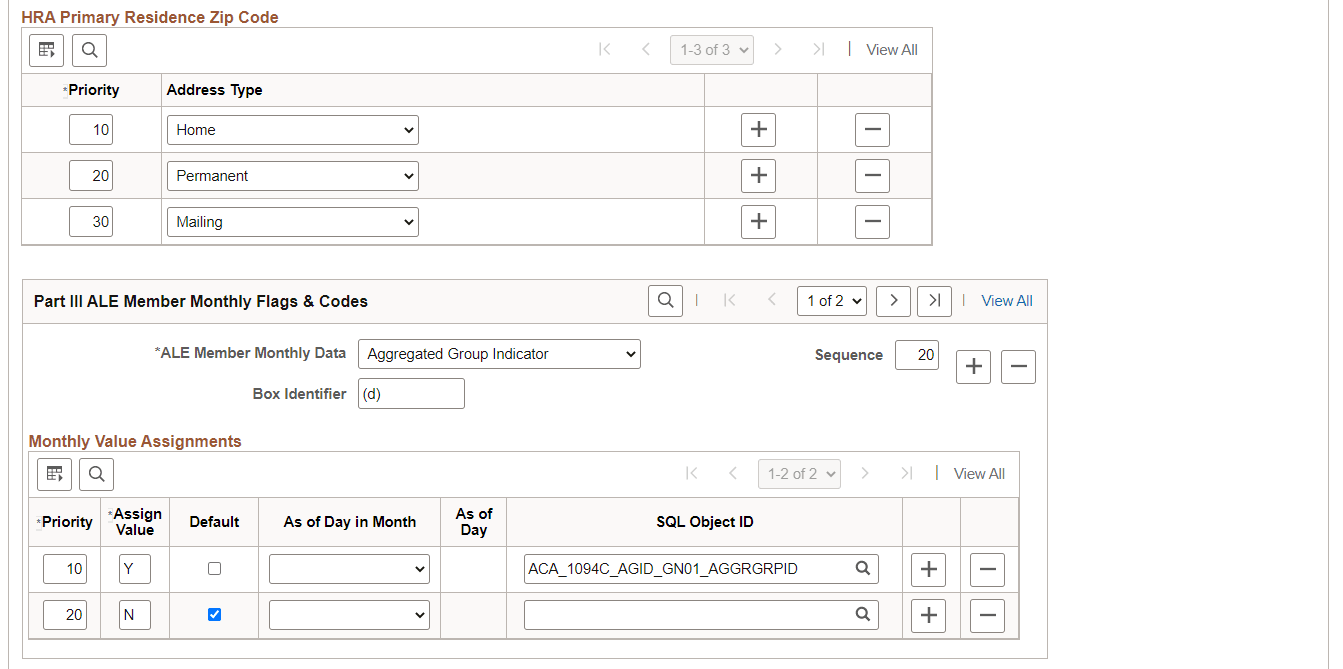
This example illustrates the fields and controls on the ACA Data Extract Definition 1 page (Page 3 of 3).
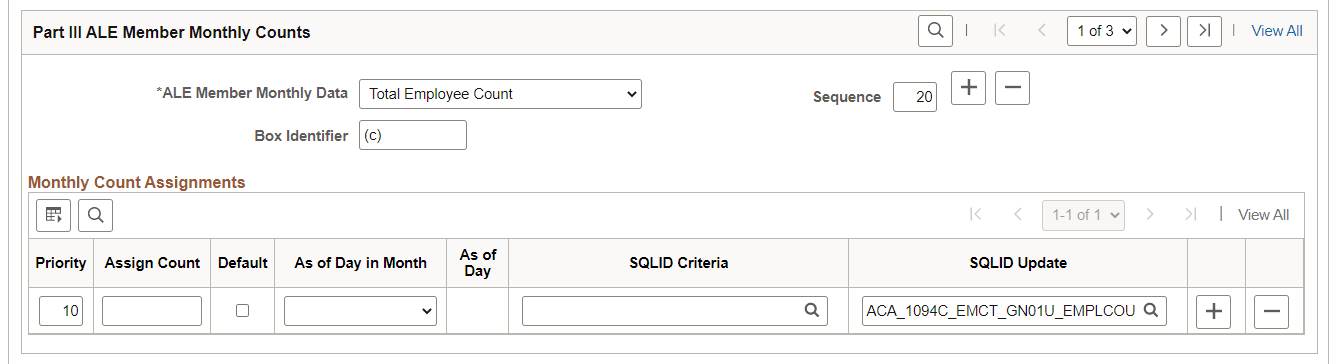
| Field or Control | Description |
|---|---|
|
Data Extract ID |
Assign a Data Extract ID for each set of data extract rules. Data Extract ID 1094C1095C is system delivered for extracting employer and employee data for Forms 1094-C and 1095-C. |
|
Data Extract Options |
|
|
Common As of Day in Month |
Select the common date to be used for effective date extract of all monthly data. The options available are First Day, Specified Day, or Last Day. |
|
Specified As of Day |
This edit box appears only when you select Specified Day from the Common As of Day in Month drop-down menu. Specify the day to use for each month. |
|
Eligible Plan Types |
|
|
Plan Type |
Select the plan types that are eligible for this extract. |
|
Plan Start Month for Benefit Program |
|
|
Benefit Program |
Select the benefit program that is eligible for this extract. |
|
Plan Start Month |
Enter the start month for the benefits plan. |
|
HRA Primary Residence Zip Code |
|
|
Priority |
Enter a number to define the priority of the address type to be used for the extract. |
|
Address Type |
Select the address type to be used for the extract. This includes values such as Home, Permanent, Mailing and Business. |
|
Part III ALE Member Monthly Flags & Codes |
|
|
ALE Member Monthly Data |
Valid ALE Member Monthly Data options are:
|
|
Sequence |
Specify the order of processing in the main extraction process. |
|
Box Identifier |
Enter the box number or letter used in Form 1094-C and Form 1095-C. |
|
Monthly Value Assignments |
|
|
Priority |
Specify the order of processing within the monthly data type. |
|
Assign Value |
Enter the value, count, or amount according to the corresponding monthly data type. |
|
Default |
Select this check box to use the Assign Value as default. |
|
As of Day in Month |
If specified, this As of Day in Month overrides Common As of Day in Month for effective date extract of this monthly data value assignment. The options available are First Day, Specified Day or Last Day. |
|
SQLID Object |
Enter the SQL that defines the data subject to data extraction. |
|
Part III ALE Member Monthly Counts |
|
|
ALE Member Monthly Data |
Valid ALE Member Monthly Data options are:
Note: MEC Employee Offer Count is not reported on Form 1094-C but is needed in determining Column (a) Minimum Essential Coverage Offer Indicator (e.g. the employer offered MEC to at least 95% of full-time employees) |
|
Monthly Count Assignments |
|
|
Priority |
Specify the order of processing within the monthly data type. |
|
Assign Value |
Enter the value, count, or amount according to the corresponding monthly data type. |
|
Default |
Select this check box to use the Assign Value as default. |
|
As of Day in Month |
If specified, this As of Day in Month overrides Common As of Day in Month for effective date extract of this monthly data value assignment. The options available are First Day, Specified Day or Last Day. |
|
As of Day |
This edit box appears only when you select Specified Day from the As of Day in Month drop-down menu. |
|
SQLID Criteria |
Enter the SQL that defines the data subject to data extraction. |
|
SQLID Update |
Enter the SQL that will provide update to monthly data extraction. |
Note:
User defined SQL objects can be created in PeopleSoft Application Designer to provide SQLID Criteria and SQLID Update for data extraction and SQL name should start with ‘ACA’.
This example illustrates the fields and controls on the ACA Data Extract Definition 2 page (Page 1 of 3).
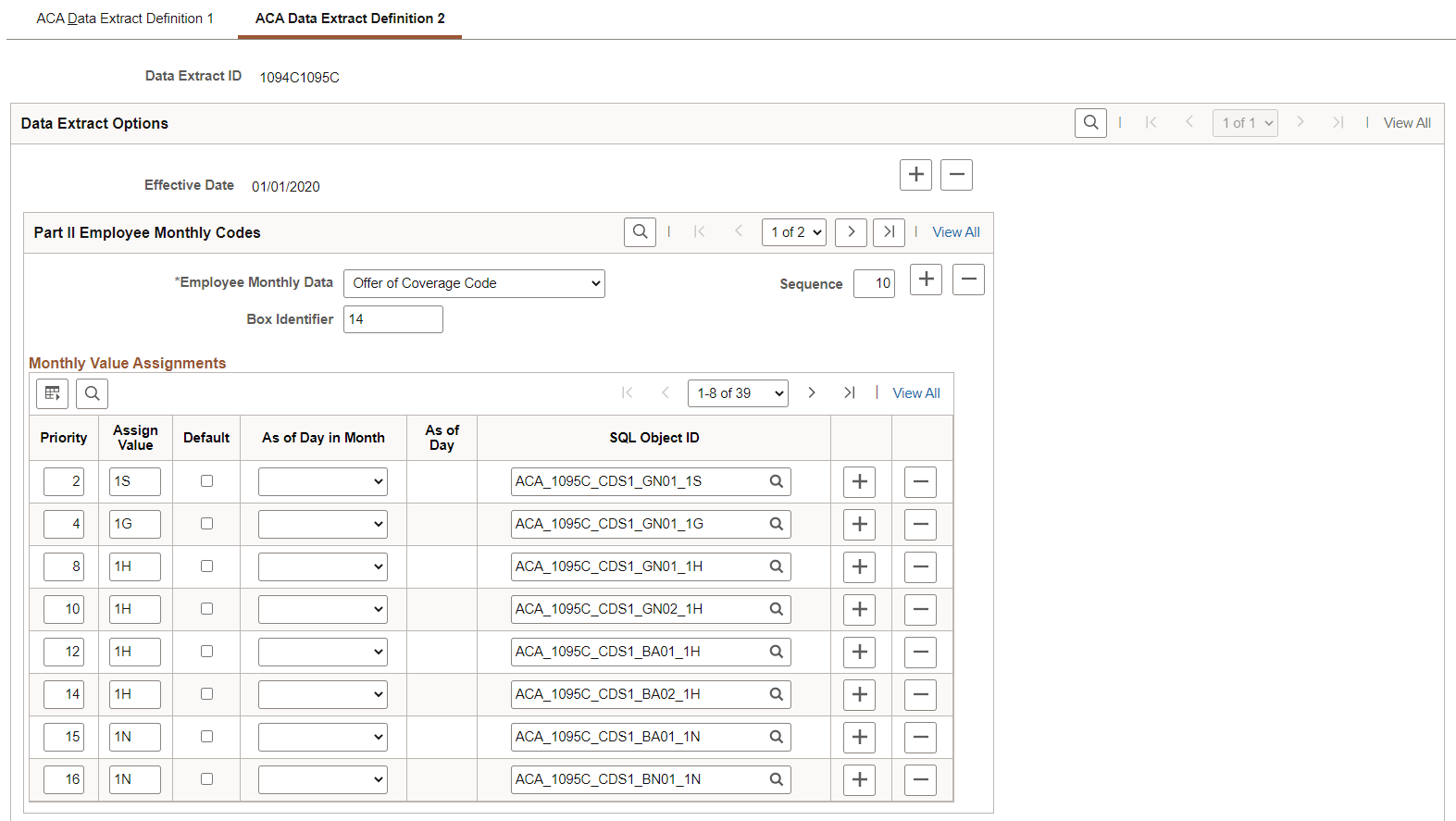
This example illustrates the fields and controls on the ACA Data Extract Definition 2 page (Page 2 of 3).
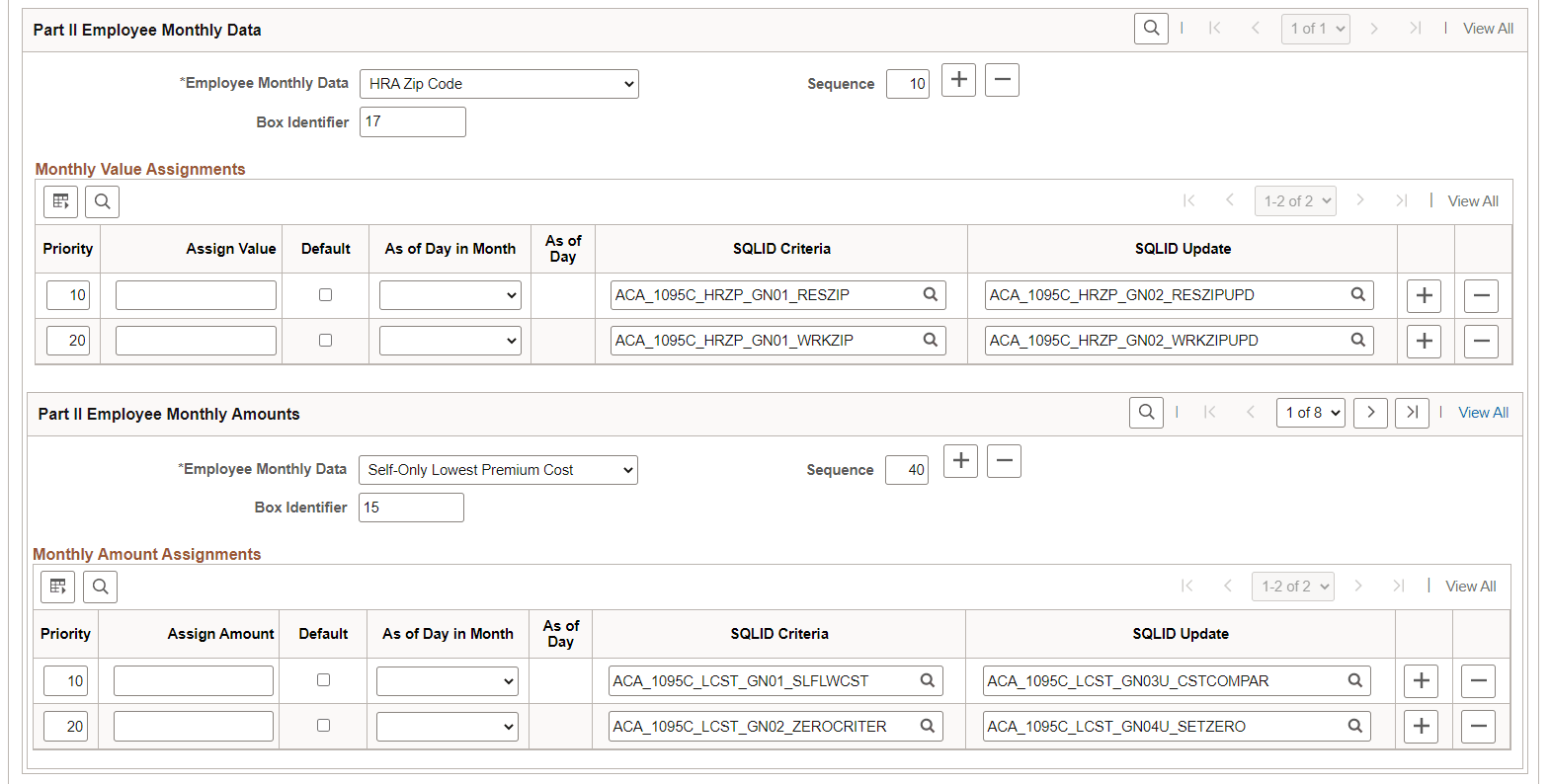
This example illustrates the fields and controls on the ACA Data Extract Definition 2 page (Page 3 of 3).
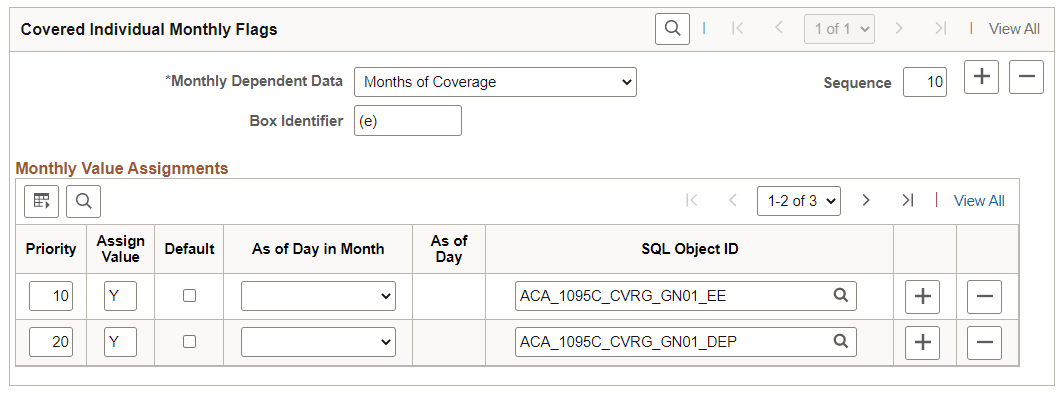
| Field or Control | Description |
|---|---|
|
Part II Employee Monthly Codes |
|
|
Employee Monthly Data |
Monthly codes to report for the employee. Valid options are:
|
|
Part II Employee Monthly Amounts |
|
|
Employee Monthly Data |
Monthly amounts to report for the employee. Valid option is Self-Only Lowest Premium Cost. |
|
Covered Individual Monthly Flags |
|
|
Monthly Dependent Data |
Valid option is Months of Coverage. |
ACA Data Source Page
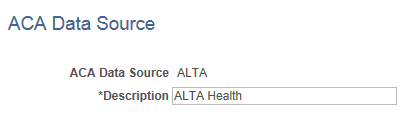
Employee form data can be uploaded using Excel-CI Load. Use the ACA Data Source page (ACA_DATA_SOURCE) to define other data sources to be used in Excel-CI Load.
This example illustrates the fields and controls on the ACA Data Source page.
| Field or Control | Description |
|---|---|
|
ACA Data Source |
Assign a source ID to identify the source of data loaded using Excel-CI Load. |