Setting Up the Service Step Table
To set up the service step table, use the Service Step Table (SERVICE_STEP_TABLE) component.
This section provides an overview of the service step table and discusses how to enter service step table information.
Page Used to Set Up the Service Step Table
| Page Name | Definition Name | Usage |
|---|---|---|
|
SERVICE_STEP_TABLE |
Enter service step table information that links the rate of employer matching contributions to an employee's length of service. |
Understanding the Service Step Table
When you set up savings plans, you can define your organization's employer match according to the employee's years of service. The Service Step Table defines the different intervals, tax classification, and amount of match.
You can also define deduction classifications based on either a percentage of the employee's gross salary or a percentage of the employee's contribution amount.
Service Step Table Page
Use the Service Step Table page (SERVICE_STEP_TABLE) to enter service step table information that links the rate of employer matching contributions to an employee's length of service.
Navigation:
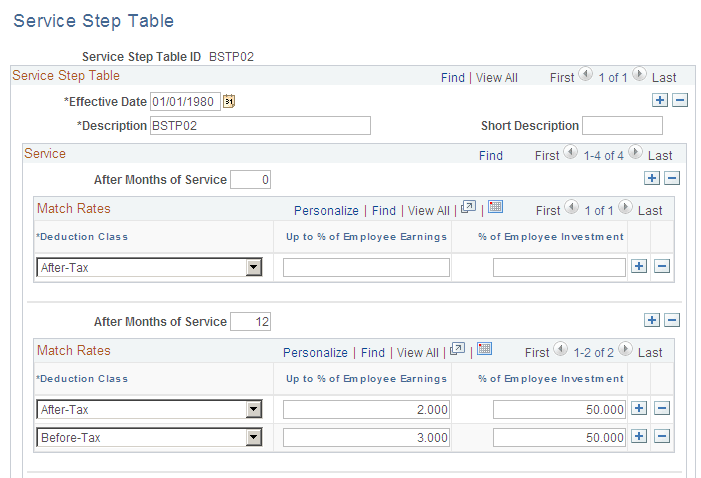
This example illustrates the fields and controls on the Service Step Table page. You can find definitions for the fields and controls later on this page.
| Field or Control | Description |
|---|---|
|
After Months of Service |
Enter the number of months the employee must be employed to receive the employer match. |
|
Deduction Class |
Enter the tax classification for this match. |
|
Up to % of Employee Earnings (up to percent of employee earnings) |
Enter the maximum amount of the employer match contribution percentage. |
|
% of Employee Investment (percent of employee investment) |
Enter the percentage amount of the employee contribution that the employer will match. |
Example of Before-Tax and After-Tax Matching
Assume you have a 401(k) plan that's set up to match:
-
50% for the first 3% of the employee's salary for before-tax contributions.
-
100% up to 6% of the employee's salary for before-tax contributions.
-
25% on the first 2%, 50% up to 4%, and 100% up to 6% on the employee's after-tax contributions.
Here's how you set this up:
| Deduction Class | Up to % of Employee Earnings | % of Employee Investment |
|---|---|---|
|
Before |
3 |
50 |
|
Before |
6 |
100 |
|
After |
2 |
25 |
|
After |
4 |
50 |
|
After |
6 |
100 |
Setting Up the Service Step Table for Thrift Savings Plan (TSP) Employer Match Calculation for Federal Benefits
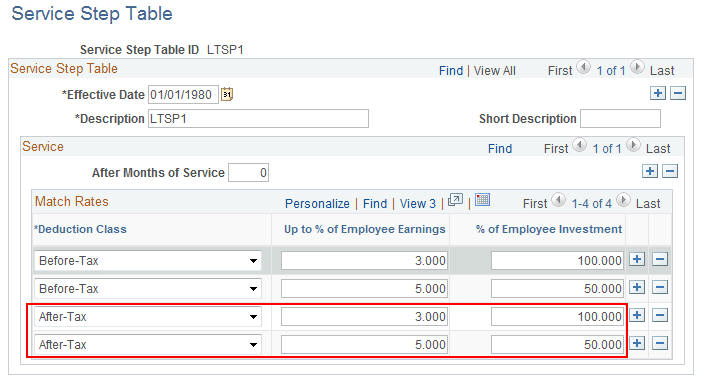
For Thrift Savings Plan (TSP) Employer Match Calculation, set up the Service Step Table as follows:
1. The first 3% of contribution is 100% Employer Match.
2. The remaining contribution is 50% Employer Match.
3. Total contribution for matching cannot exceed 5%.
This image shows the Service Step Table for Thrift Savings Plan (TSP) employer match calculation for federal benefits.
Example of After Months of Service Rewards
This example shows how to use the After Months of Service field to create multiple service steps to reward employees for staying with the company.
| After Months of Service | Deduction Class | Up to % of Employee Earnings | % of Employee Investment |
|---|---|---|---|
|
0 |
Before |
3 |
50 |
|
0 |
Before |
6 |
100 |
|
0 |
After |
2 |
25 |
|
0 |
After |
4 |
50 |
|
0 |
After |
6 |
100 |
|
24 |
Before |
10 |
100 |
|
24 |
After |
2 |
50 |
|
24 |
After |
4 |
75 |
|
24 |
After |
6 |
100 |