Reviewing Error Messages for Batch Encumbrance Processing
Pages Used to Review Encumbrance Processing Error Messages and Logs
| Page Name | Definition Name | Usage |
|---|---|---|
|
ENC_MESSAGES |
Review encumbrance error messages online. |
|
|
RUNCTL_BUD009 |
Run an Encumbrance Message report (BUD009), which provides information on encumbrance processing error messages. Before using this page, you must have run the encumbrance processes. |
Review Encumbrance Error Messages Page
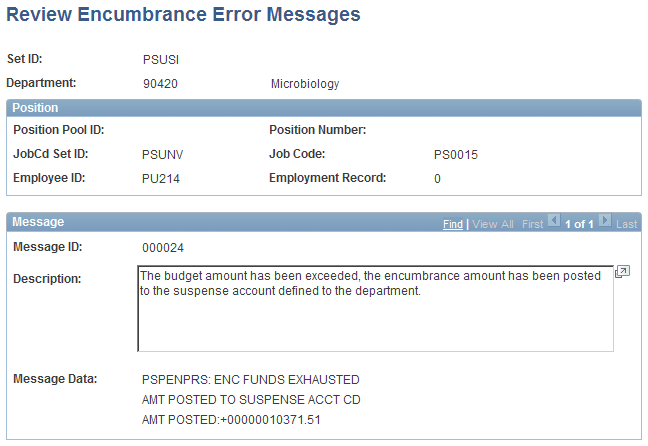
Use the Review Encumbrance Error Messages page (ENC_MESSAGES) to review encumbrance error messages online.
Navigation:
This example illustrates the fields and controls on the Review Encumbrance Error Messages page.
Encumbrance Message Report Page
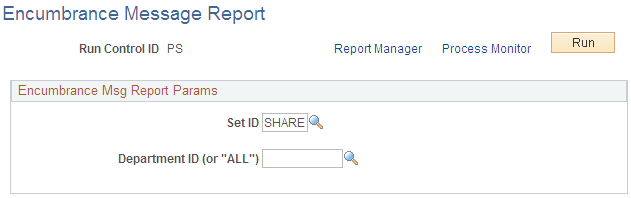
Use the Encumbrance Message Report page (RUNCTL_BUD009) to run an Encumbrance Message report (BUD009), which provides information on encumbrance processing error messages.
Before using this page, you must have run the encumbrance processes
Navigation:
This example illustrates the fields and controls on the Encumbrance Message Report page.
| Field or Control | Description |
|---|---|
|
Department ID (or "ALL") |
Enter the department ID whose encumbrance messages you are reporting. Enter ALL to report on all departments in the selected SetID. |