Uploading HCM Budgets Data to PeopleSoft Budgets
Using the Data Export to Budgets process (BUD010.SQR), you can create baseline budget data (from job and position information) that can then be uploaded to PeopleSoft Budgets at the end of the fiscal year. The Data Export to Budgets process exports data from the Job Code component (JOBCODE), Job Data component (JOB_DATA), Position Data component (POSITION_DATA), Define Salary Grades (SALARY_GRADE_TBL), and Dept Budget Earnings page (DEPT_BUDGET_ERN).
The Data Export to Budgets process creates a row of funding information for every person's job data record (or appointment). Depending on the level of Position Management you have selected for your installation, the process may also create a row of funding information for every unfilled position. The general ledger accounts that fund these appointments and positions are selected based on a pre-defined hierarchy and are written to a table on your database, which is in turn used to populate four database views. These views contain the data that is required by PeopleSoft Budgets.
Pages Used to Export Budgets Data to PeopleSoft Budgets
| Page Name | Definition Name | Usage |
|---|---|---|
|
RUNCTL_BUD010 |
Run the Data Export to Budgets process (BUD010.SQR), which creates baseline budget data that can be uploaded to PeopleSoft Budgets at the end of the fiscal year. |
|
|
ChartField Detail Page |
HMCF_HRZNTL_CFLD |
Use to select individual ChartField values or search for an existing combination code. |
Related Topics
- Dept Budget Earnings Page
- Application Fundamentals: Classifying Jobs
- PeopleSoft Human Resources Manage Positions: Creating Positions
- PeopleSoft Human Resources Administer Workforce: (Classic) Adding Organizational Instances
- PeopleSoft Human Resources Manage Base Compensation and Budgeting: Salary Grade Table Page
Budgets Export Page
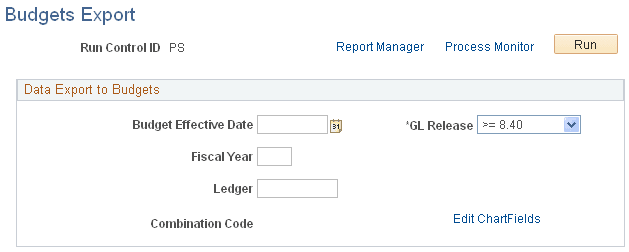
Use the Budgets Export page (RUNCTL_BUD010) to run the Data Export to Budgets process (BUD010.
SQR), which creates baseline budget data that can be uploaded to PeopleSoft Budgets at the end of the fiscal year.
Navigation:
This example illustrates the fields and controls on the Budgets Export page.
| Field or Control | Description |
|---|---|
|
Budget Effective Date |
Enter the appropriate budget effective date. The system uses the Budget Effective Date and the Fiscal Year you specify to determine which budget is the final source of funding data for appointments and positions. |
|
Fiscal Year |
Enter the appropriate fiscal year. The system uses the Fiscal Year and Budget Effective Date to select funding information for a particular budget. |
|
Ledger |
Indicate to which budget ledger you are sending the budget data. |
|
Combination Code |
Indicate which combination code should be used when no other funding source is indicated. See Application Fundamentals: Editing ChartField Combinations in HCM Transactions. |