(Classic) Enabling Profile Actions
To enable profile actions, use the Profile Actions (JPM_PROFILE_ACTION) component.
Note:
Profile Actions are specific to the Classic Manage Profile pages and are not used in Fluid Manage Profiles pages.
These topics provide an overview of profile actions, and discusses how to enable profile actions.
Pages Used to Enable Profile Actions
| Page Name | Definition Name | Usage |
|---|---|---|
|
JPM_PROFILE_ACTION |
Enable profile actions by person or non-person profile component for each role. |
Understanding Profile Actions
The Profile Actions field appears on the Classic non-person profile and person profile pages. It enables administrators, managers, and employees to perform transactions directly from the profile pages, as shown in this example:
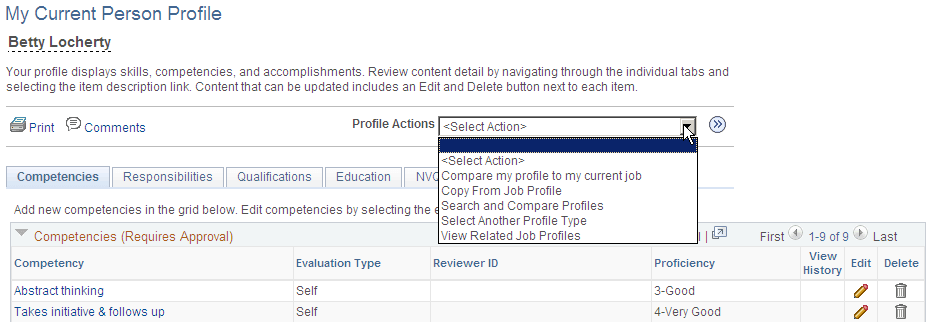
Use the Profile Actions component to modify action descriptions and to control which Profile Management roles within the organization (Administrator, Manager, or Employee) have access to specific actions. This functionality enables you to hide or display profile actions according to your organizational policies. For example, if your organization does not use the Search and Compare Profiles transaction, you can hide this option for each profile role.
Pages That Display the Profile Actions Field
The Profile Actions field is available on the Classic person and non-person profile pages throughout the system. The following pages display the Profile Actions field.
The administrator uses these pages to access profile data by navigating to :
-
Person Profiles
-
Non-person Profiles
Note:
The administrator can access the fluid to access these classic components.
See Maintaining Profiles as an Administrator.
Employees use these self-service pages to access profile data by navigating to :
-
My Current Profile
-
My Historical Profile
-
My Job Profiles
-
View Job Profiles
Managers use these manager self-service pages to access profile data by navigating to :
-
Current Team Profiles
-
Historical Team Profiles
-
Maintain Job Profile
See PeopleSoft eDevelopment: (Classic) Maintaining Person Profiles as an Employee or Manager and PeopleSoft eDevelopment: (Classic) Viewing and Updating Job Profiles.
Delivered Profile Actions
The following tables list the Profile Actions that are delivered with the Manage Profiles business process, although some of the actions are not available for all profile roles or pages.
This table lists the profile actions available for the Person profile transaction pages and the Profile Management roles that can perform these transactions:
| Profile Action | Usage | Administrator Pages | Employee Self Service Pages | Manager Self Service Pages |
|---|---|---|---|---|
|
Copy From Job Profile |
Copy items from a non-person profile to the employee's profile using the Copy Items from Job Profile page, which lists the profiles related to the employee's active jobs. |
Yes |
Yes |
Yes |
|
Update Profile Groups |
Categorize your profiles by profile groups using the Update Profile Groups page, which you use to list the profile group types and profile groups to which you want to add the profile. |
Yes |
No |
No |
|
Compare my profile to current job |
Compare your own profile to your job profile. If more than one job profile applies to your job, select from a list of all applicable job profiles to compare. |
No |
Yes |
No |
|
Compare employee profile to current job |
Compare an employee’s profile items to his or her job profile items. If more than one job profile applies to the employee, select from a list of all applicable job profiles to compare. |
Yes |
No |
Yes |
|
View Related Job Profiles |
View a list of non-person profiles that are related to the employee's job data. The system determines which non-person profiles are related to an employee by searching the employee's job data record. If the employee has multiple jobs, the system checks all the person's active jobs for matching non-person profiles. |
Yes |
Yes |
Yes |
|
Search and Compare Profiles |
Select and perform a search on the Search for Profiles page |
Yes |
Yes |
Yes |
This table lists the profile actions available for the Non-Person profile transaction types:
| Profile Action | Usage | Administrator Pages | Employee Self Service Pages | Manager Self Service Pages |
|---|---|---|---|---|
|
Update Profile Groups |
Categorize your profiles by profile groups on the Update Profile Groups page, which you use to list the profile group types and profile groups to which you want to add the profile. |
Yes |
No |
No |
|
Express Interest for Employee |
Add a non-person profile to a person's interest list using the Person Search - Simple page, which you use to search for an employee whose interest list you want to update. |
Yes |
No |
Yes |
|
Express Interest |
Add a job profile to your interest list using the Add to Interest List - Confirmation page. |
No |
Yes |
No |
|
Search and Compare Profiles |
Select and perform a search on the Search for Profiles page |
Yes |
Yes |
Yes |
This table lists the profile actions available for the Historical profile transaction types:
| Profile Action | Usage | Administrator Pages | Employee Self Service Pages | Manager Self Service Pages |
|---|---|---|---|---|
|
View As Of Another Date |
Indicate a new as of date on the Select New As Of Date page to view profile information as of a certain time. |
No |
Yes |
Yes |
Profile Actions Page
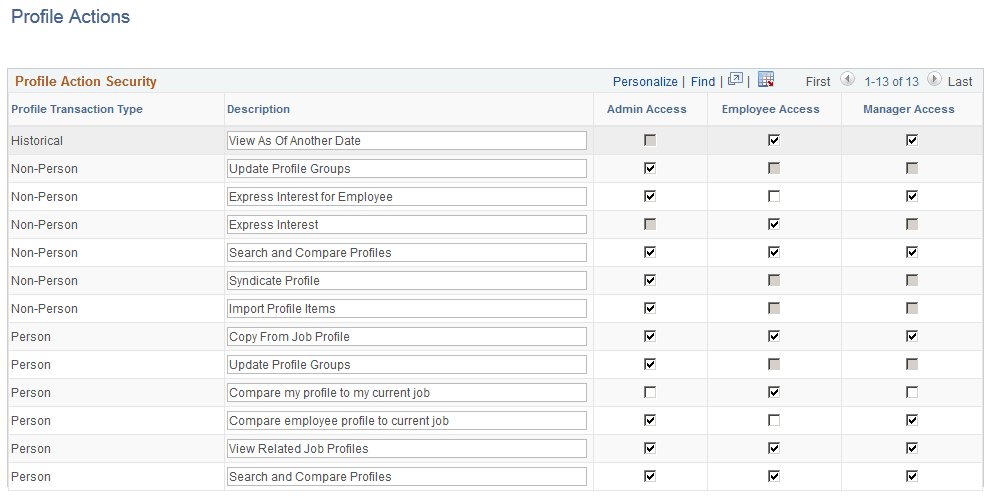
Use the Profile Actions page (JPM_PROFILE_ACTION) to enable profile actions by person or non-person profile component for each role.
Navigation:
This example illustrates the fields and controls on the Profile Actions page. You can find definitions for the fields and controls later on this page.
Note:
This Profile Action list is maintained by PeopleSoft development. Changes to this list require code line modifications. For a list of all profile actions delivered with the system, see Delivered Profile Actions in the Understanding Profile Actions topic.
See Understanding Profile Actions.
Profile transaction types are not available for all roles. When the system does not allow a profile transaction for a specific role, the access check box for that role is not available for selection.
| Field or Control | Description |
|---|---|
|
Profile Transaction Type |
Identifies the types of profile pages where this transaction can be used. This is also the high level key value for this table. Transaction types for Manage Profiles are:
|
|
Description |
View or modify the text that will appear in the Actions Type drop-down list. |
|
Admin Access (administrator access) |
Select to add this action type to the Actions Type drop-down list on the administrator profile pages in the system. |
|
Employee Access |
Select to add this action type to the Actions Type drop-down list on employee self-service profile pages in the system. |
|
Manager Access |
Select to add this action type to the Actions Type drop-down list on manager self-service profile pages in the system. |
Note:
Deselecting a <role> Access check box will remove the profile action option from the Profile Actions drop-down menu list. If all options that could appear for a role in the Profile Actions drop-down menu list are deselected, the Profile Actions field will be hidden on the page.