Managing Acknowledgement Requests for Job Profiles
Profile Management uses the Acknowledgement Framework to request that employees acknowledge their understanding of the profiles associated with their job.
To generate requests for job profile acknowledgements, use the Run Acknowledgement Request (JPM_ACK_REQ_RC) component.
This topic provides an overview of job profile acknowledgements and discusses how to run the Acknowledgement Request process.
Pages Used to Manage Acknowledgement Requests for Job Profiles
| Page Name | Definition Name | Usage |
|---|---|---|
|
JPM_ACK_REQ_RC |
Create acknowledgement requests for all employees associated with job-related (non-person) profiles participating in the job profile acknowledgement process. |
Understanding Job Profile Acknowledgements
To ensure employees are aware of the profile attributes associated with their jobs, Profile Management administrators can enable the Request Acknowledgement option for job-related (non-person) profile types for specific identities (such as job, job family, position data, and so forth). Administrators can configure the system to notify employees that they need to review and acknowledge the requirements of their job profiles. Managers and administrators can review the status of acknowledgements at any time and even submit a request to send out new acknowledgement requests, such as when they make updates to a profile.
Your organization can take advantage of the job profile Request Acknowledgement functionality through these pages and procedures:
-
Enable Request Acknowledgements for a non-person profile identity option on the Profile Types - Identities Page.
All profiles with this profile type and identity are considered participants in the Request Acknowledgement process.
-
Use the Run Acknowledgement Request Page to schedule the Run Acknowledgements (JPM_ACK_REQ) process to create employee acknowledgement requests.
All non-person profiles with the Request Acknowledgements selected for a profile type identity and those profiles added to the Request Acknowledgements temporary table (see item 5) will be picked up by the process. If the run control is configured to do so, employees associated with those job profiles will be notified through email. You can also send reminder notifications after a specified number of days.
Note:
You should run this process on a regular basis to pick up any new participating profiles, acknowledgement requests, and employees new to those profiles participating in job profile acknowledgements.
-
(Employees) Employees can review and acknowledge job profiles on the My Job Profiles pages (see PeopleSoft eDevelopment: My Job Profiles Page (for Employees), View Job Profiles Page (for Employees), and Maintain Job Profiles Page (for Managers)).
Note:
When an employee needs to review a job profile, the PeopleSoft eDevelopment: My Job Profiles Tile (for Employees) will display the Action Required notification.
-
As a manager or administrator, view the acknowledgement status of employees.
-
(Managers) Use the PeopleSoft eDevelopment: Acknowledgement Status Page to view the acknowledgement status of your direct and indirect reports. You can also see if their job profiles are participating in the acknowledgement process or if the job has not been assigned a job profile.
-
(Administrators) Use the Enterprise Components: Review Acknowledgements Page in the Acknowledgement Framework to see those employees that have acknowledged their job profiles.
-
-
As a manager or administrator, request acknowledgements for a specific job profile.
This is helpful when you have updated a job-related profile and want employees to review the updated attributes.
Note:
The request will be sent to all employees associated with this profile.
-
(Managers) Select the Request Acknowledgement button on the Maintain Job Profiles page (see PeopleSoft eDevelopment: My Job Profiles Page (for Employees), View Job Profiles Page (for Employees), and Maintain Job Profiles Page (for Managers)) to request employees acknowledge a specific profile.
-
(Administrators) Select the Request Acknowledgement action item from Profile Actions drop-down menu on the Non-person Profile Page.
Important:
You must first activate the JPMRequestProfAcknowledgement event and its handler in Event Manager.
When a user selects the Request Acknowledgement option, it raises the JPMRequestProfAcknowledgement event in Event Manager. The event handler processes the request and stores it for the next run of the Run Acknowledgements process (see item 2 in this list). The process will generate a new request for all employees tied to this job profile, even if they have acknowledged the profile previously.
-
Note:
Oracle PeopleSoft delivers Notification Composer Framework to manage the setup and administration of all notifications in one central location.
Once you have adopted the Notification Composer feature, you must use it to create new notifications and manage your existing notifications.
Notifications delivered with HCM Image 47 or later must use Notification Composer.
For more information about Notification Composer Framework, see Enterprise Components: Understanding Notification Composer.
Run Acknowledgement Request Page
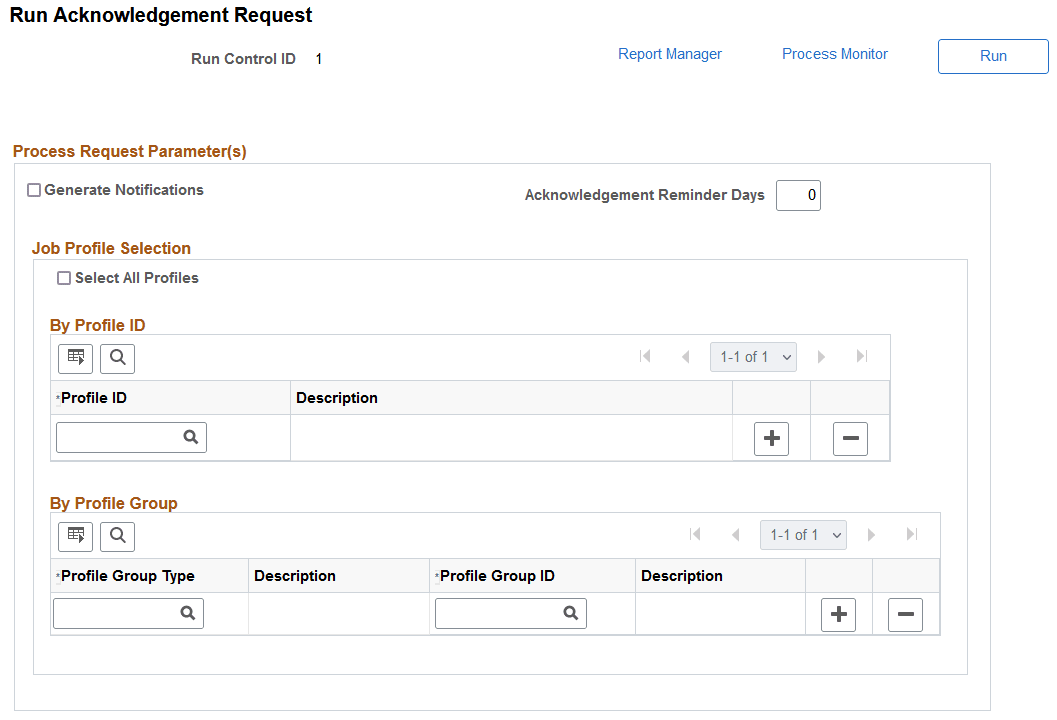
Use the Run Acknowledgement Request page (JPM_ACK_REQ_RC) to create acknowledgement requests for all employees associated with job-related (non-person) profiles participating in the job profile acknowledgement process.
Navigation:
-
-
From the Administer Workforce home page in fluid, select the .
This example illustrates the fields and controls on the Run Acknowledgement Request page.
This process identifies:
-
Profile types with the Request Acknowledgement option enabled on the Profile Types - Identities Page and those non-person profiles to which they are associated.
-
Manager or administrator requests made from the following locations:
-
(Manager) Request Acknowledgement button at the top of the Maintain Job Profiles page (see PeopleSoft eDevelopment: My Job Profiles Page (for Employees), View Job Profiles Page (for Employees), and Maintain Job Profiles Page (for Managers)).
-
(Administrator) Request Acknowledgement action from the Non-person Profile Page, Profile Actions field.
-
-
All employees tied to participating non-person profiles and sends a notification, if configured to do so.
After the process runs, the My Job Profile tile and pages will display Action Required badges and an Acknowledge button for participating job profiles.
Managers can view the status of these acknowledgements using the PeopleSoft eDevelopment: Acknowledgement Status Page.
Administrators use the Enterprise Components: Review Acknowledgements Page in the Acknowledgement Framework to view job profile acknowledgements.
| Field or Control | Description |
|---|---|
|
Generate Notifications |
Select this check box to send an email notification to employees to review their job profile. This notification will be sent only to those associated with the job profiles picked up by the Request Acknowledgement process. |
|
Acknowledgement Reminder Days |
Enter the number of days after the initial acknowledgement request was sent that a reminder notification should be sent to employees. For example, if you enter 5, and the employee has not yet acknowledged the job profile after five days, then the system will send out the reminder email. |
Job Profile Selection
| Field or Control | Description |
|---|---|
|
Select All Profiles |
Select this check box to run the process for all participating job profiles. Participating profiles are non-person profiles that have the Request Acknowledgement option selected on the Profile Types - Identities Page for at least one of it's identities. When you select this option, the remaining fields in this section are hidden. |
|
Profile ID and Description |
Enter individual profile IDs for which you want to run the acknowledgement process. The process creates acknowledgement requests for employees associated with profiles that are configured for acknowledgements. For information on setting up non-person profiles, see the Non-person Profile Page documentation. |
|
Profile Group Type and Description |
Select a profile group that will contain the set of profiles for which you want to run the acknowledgement process. When you select a group type, you need to enter at least one group ID from that group type. For information on creating groups, see the Creating Profile Group Types and Profile Groups documentation. |
|
Profile Group ID and Description |
Select a group ID from the group type you entered. The process creates acknowledgement requests for employees associated with job-related profiles in the group that are configured for acknowledgements. |