Defining Content Groups
To set up content groups, use the Content Groups (JPM_CAT_GROUPS) and the Content Group Members (JPM_CAT_GMEMB) components.
These topics discuss how to define content groups.
Pages Used to Define Content Groups and Members
| Page Name | Definition Name | Usage |
|---|---|---|
|
JPM_CAT_GROUPS |
Define content group types and the groups within each content group type. |
|
|
JPM_CAT_GMEMB |
Define content group members. Add content items to the content groups that you have created on the Content Group Types page or view existing item members for a content group. |
Content Group Types Page
Use the Content Group Types page (JPM_CAT_GROUPS) to define content group types and the groups within each content group type.
Navigation:
This example illustrates the fields and controls on the Content Group Types page. You can find definitions for the fields and controls later on this page.
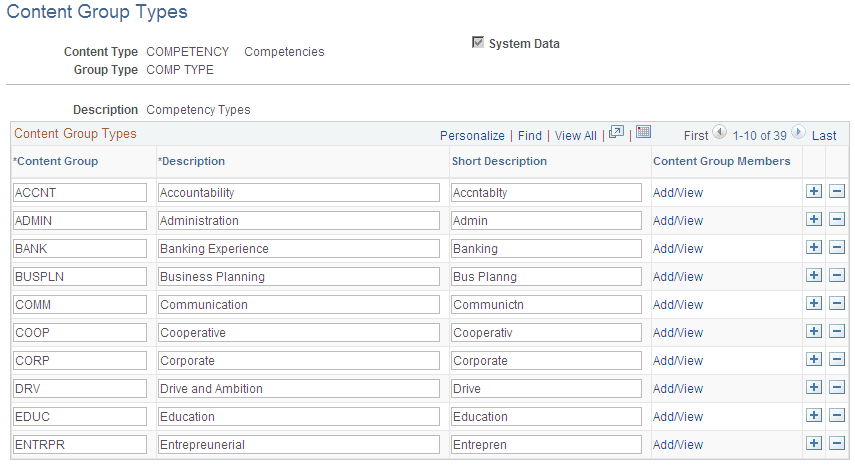
Content Group Types
This group box lists all the content groups defined for the selected content group type.
| Field or Control | Description |
|---|---|
|
Content Group |
Enter the name of the content group. |
|
Content Group Members |
Click the Add/View link to access the Content Group Members page that lists the content items belonging to the group. |
Content Group Members Page
Use the Content Group Members page (JPM_CAT_GMEMB) to define content group members.
Add content items to the content groups that you have created on the Content Group Types page or view existing item members for a content group.
Navigation:
-
-
Click the Add/View link on the Content Group Types page.
-
Click the View link on the Content Item - Group Memberships page.
This example illustrates the fields and controls on the Content Group Members page. You can find definitions for the fields and controls later on this page.
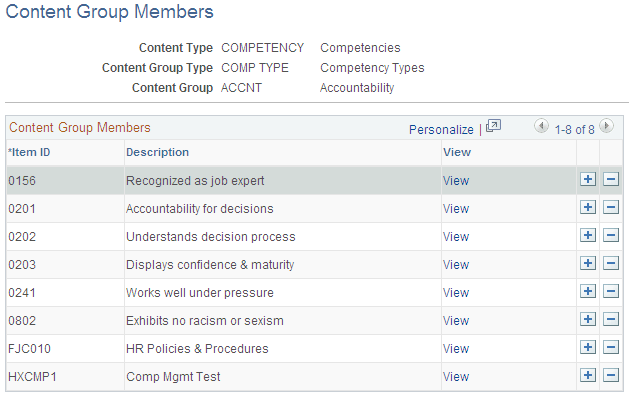
Use this page to view, add, or delete items that are members of the content group.
| Field or Control | Description |
|---|---|
|
View |
Click this link to view the item definition. When you click the link, the system displays the Content Items component. |