Managing Interest Lists
These topics provide an overview of interest lists, list common elements, and discuss how to manage interest lists.
Pages Used to Manage Interest Lists
| Page Name | Definition Name | Usage |
|---|---|---|
|
JPM_INTEREST_PERS |
View an employee's interest list and add profiles to the list. |
|
|
JPM_INTEREST_PROF |
View a list of employees who have a selected profile on their interest list. You can also add the selected profile to an employee's interest list. |
Understanding Interest Lists
Interest lists enable employees to maintain a list of the non-person profiles that are of interest. They can also compare the added profile to their own profile to determine degree of a fit. The interest list can include any profile. For example, employees could add profiles for jobs that they want to include in their career planning, or job profiles that are similar to their own profile. Each employee has one interest list that can be modified by the employee, the employee's manager, and the profile administrator:
-
Employees maintain their own interest list using the self-service options provided in eDevelopment.
The interest list shows who added each profile to the interest list, and employees can remove any profiles that they added. Employees cannot remove profiles added by their manager or the profile administrator.
-
Managers can view and modify interest lists for their direct reports using the manager self-service options in eDevelopment.
Managers can remove profiles that they added to an interest list only. They cannot remove profiles that are added by the employee or the profile administrator.
-
Administrators have access to interest lists based on the row-level security permissions associated with their role.
Administrator can remove any profile from an interest list, including those added by the employee and manager.
Common Elements Used to Manage Interest Lists
| Field or Control | Description |
|---|---|
|
Profile |
Click the profile link to view the profile. From the Interest List page, the link takes you to the Non-person Profile page and from the Interest List - View by Profile page, the link takes you to the Person Profile page. |
|
Assigned By |
Displays the name of the person who added the profile to the interest list. This can be the employee, the employee's manager, or an administrator. |
Interest List by Person Page
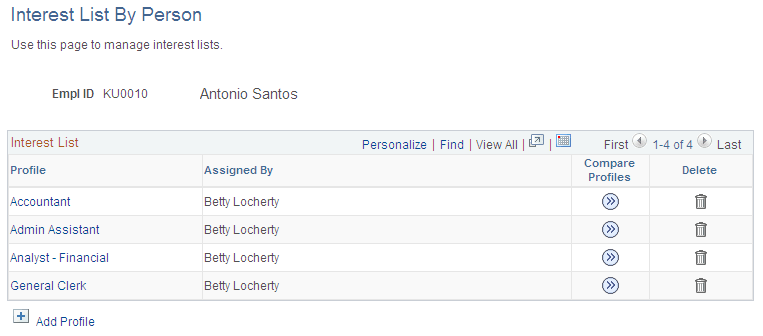
Use the Interest List by Person page (JPM_INTEREST_PERS) to view an employee's interest list and add profiles to the list.
Navigation:
This example illustrates the fields and controls on the Interest List by Person page. You can find definitions for the fields and controls later on this page.
| Field or Control | Description |
|---|---|
|
Add Profile |
Click this link to add another profile to the employee's interest list. |
|
Compare Profiles |
Click this icon to access the Compare Results page. In order to use the compare process, you must first build the appropriate search indexes. See. Building the Search Indexes. |
Interest List by Profile Page
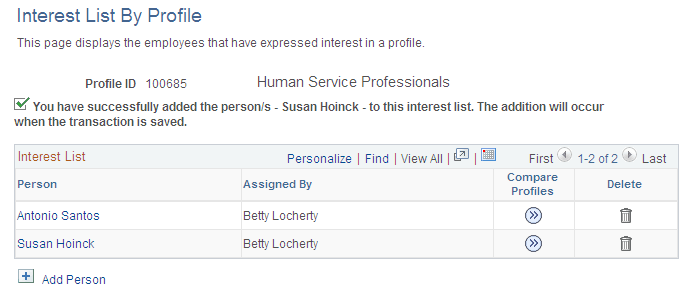
Use the Interest List by Profile page (JPM_INTEREST_PROF) to view a list of employees who have a selected profile on their interest list.
You can also add the selected profile to an employee's interest list.
Navigation:
This example illustrates the fields and controls on the Interest List by Profile page. You can find definitions for the fields and controls later on this page.
| Field or Control | Description |
|---|---|
|
Add Person |
Click this link to add the profile to another employee's interest list. |
|
Compare Profiles |
Click this icon to access the Compare Results page. In order to use the compare process, you must first build the appropriate search indexes. See. Building the Search Indexes. |