Tracking Training
These topics provide an overview of how to track employee training and discuss how to track employee training.
Pages Used to Track Employee Training
| Page Name | Definition Name | Usage |
|---|---|---|
|
Training Page |
COURSE_STUDNT_ENRL |
View details of training courses that the employee has completed, enrolled in, or on the waiting list. This page displays course sessions that you manage using the Administer Training business process. |
|
Professional Training Page or Global Assignments Training Page |
EDUCAT_TRAIN_GBL |
Record employee training that is not maintained using the Administer Training business process. |
Understanding How to Track Employee Training
The Administer Training business process enables you to set up training courses and manage course sessions. If you use Administer Training to manage your training courses, the Training page (COURSE_STUDNT_ENRL) gives you a summary of employees' training history.
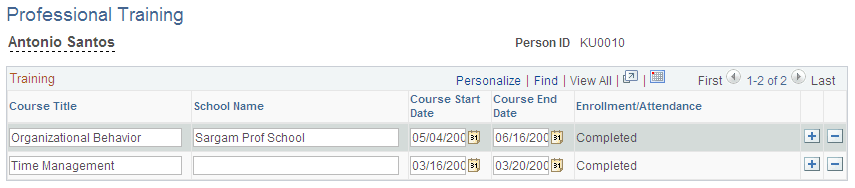
Use the Professional Training page (EDUCAT_TRAIN_GBL) to track other training that is not managed using Administer Training. You can use this page to track training that an employee is enrolled in, or has completed.
This topic discusses how to record employee training.
Professional Training Page or Global Assignments Training Page
Use the Professional Training or Global Assignments Training page (EDUCAT_TRAIN_GBL) to record employee training that is not maintained using the Administer Training business process.
Navigation:
This example illustrates the fields and controls on the Professional Training page. You can find definitions for the fields and controls later on this page.
| Field or Control | Description |
|---|---|
|
Course Title |
Enter the name of the training course. |
|
School Name |
Enter the name of educational establishment or training company that runs the course. |
|
Course Start Date and Course End Date |
Enter the date on which the course was started and completed. |