Reporting Content Catalog Items
This topic discusses how to reporting content catalog items.
Page Used to Run the Content Catalog Report
| Page Name | Definition Name | Usage |
|---|---|---|
|
JPM_CATLIST_RPT |
Run the Content Catalog Listing report (JPM_CATI_RPT) that lists the content items that have been set up for a selected content type or for all content types. Access the report in Report Manager. |
|
|
CM_COMPETENCY_SUMM |
Review the category that is assigned to competencies. You can view competencies in a selected competency category or a competency type. |
Content Catalog Listing Page
Use the Content Catalog Listing page (JPM_CATLIST_RPT) to run the Content Catalog Listing report (JPM_CATI_RPT) that lists the content items that have been set up for a selected content type or for all content types. Access the report in Report Manager.
Navigation:
This example illustrates the fields and controls on the Content Catalog Listing page. You can find definitions for the fields and controls later on this page.
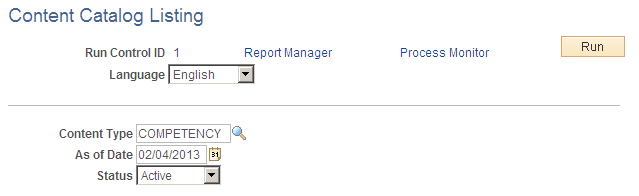
| Field or Control | Description |
|---|---|
|
Content Type |
Select the content type you want the report to include. Leave this field blank to generate a report of content items for all content types. |
|
As of Date |
Select a date to generate a list of content items effective as of the date specified. Leave this field blank to generate a report of content items for all dates. |
|
Status |
Select Active to include only items with an Active status in the report, Inactive to include only inactive items, or leave the field blank to include both active and inactive items. |
Related Topics
Competency Summary Page
Use the Competency Summary page (CM_COMPETENCY_SUMM) to review the category that is assigned to competencies.
You can view competencies in a selected competency category or a competency type.
Navigation:
This example illustrates the fields and controls on the Competency Summary page. You can find definitions for the fields and controls later on this page.
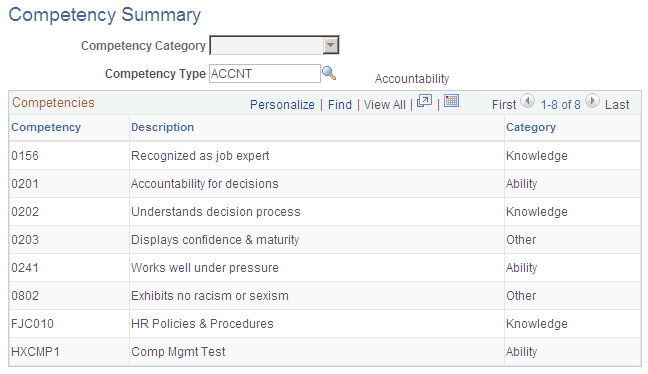
Select a competency category or type to list the competencies in that category or type. The competencies are listed in order of competency code.