Running Health and Safety Reports as Administrators Using Fluid
This topic lists the pages that Health and Safety administrators can access from a single location on the Workforce Administrator home page to run Health and Safety reports.
Pages Used to Run Health and Safety Reports as Administrators Using Fluid
| Component or Page Name | Definition Name | Usage |
|---|---|---|
|
HC_HS_REPORTING_FL_GBL |
Access a collection of administrative components for Health and Safety reporting. Important: The majority of the Health and Safety reports are documented in Application Fundamentals: Monitor Health and Safety Reports. Reports that are not included in that Health and Safety reports topic are listed in this table. |
|
|
PeopleSoft Human Resources Administer Workforce: Print Delta XML File ESP Page |
XML_RC_ESP |
Generate XML files to send to insurance companies. |
|
RUNCTL_WCB_501 |
Populate staging tables with WCB injury data. |
|
|
WCB EDI Data CAN Page |
RUNCTL_OHS501BC |
Prepare BC WCB data for file creation. |
|
Create WCB EDI File CAN Page |
PRCSRUNCNTL |
Create and send the BC WCB EDI file. |
|
Accident Data DEU |
RUNCTL_OHS501GR |
Prepare accident and incident data, and load it to temporary data table. See Application Fundamentals: Monitor Health and Safety Reports. |
|
Illness Data DEU Page |
RUNCTL_OHS504GR |
Prepare illness data, and load it to temporary data table. See Application Fundamentals: Monitor Health and Safety Reports. |
|
MIX_COM_TBL_MEX |
Identify details for Mexican mixed committees. |
|
|
RIDDOR Data Page |
RUNCTL_OHS_UK |
Collect RIDDOR data for GBR Health and Safety reporting. |
|
INIT_BC_WCB_WEB |
Create and transmit injury reports. |
|
|
Review Submission Status Page |
WCB_INC_SUB_STAT |
Request submission status. |
|
Review Error Messages Page |
WCB_INJ_ERR_RESP |
Review error messages received from the WCB. |
|
Review Success Messages Page |
WCB_INJ_RPT_RESP |
Review success messages received from the WCB. |
|
Request Submission Status Page |
WCB_SUB_STAT |
Review the submission status of an injury report. |
|
OSHA 301 Incident Report Page |
OSHA_301_SELECT |
Create OSHA-301 incident reports. See PeopleSoft Human Resources Meet Regulatory Requirements: Running the U.S. Regulatory Reports. |
|
OSHA 301 Incident Report Print Page |
RUN_CNTL_OSHA_INT2 |
Create OSHA-301 incident reports from incidents that have been specified as being OSHA reportable. See Application Fundamentals: Monitor Health and Safety Reports. |
|
OSHA 300 Incident Log Page |
RUN_CNTL_OSHA_INT1 |
Generate the OSHA 300 log. See Application Fundamentals: Monitor Health and Safety Reports. |
|
OSHA 300A Annual Summary Page |
RUN_CNTL_OSHA_INT1 |
Generate the OSHA 300A Summary report, which provides an overview of the data contained in the OSHA-300 Incident Log. See Application Fundamentals: Monitor Health and Safety Reports. |
|
OSHA-200 Log |
RUNCTL_CALENDARYR |
Lists the case numbers and details of each injury and illness that occurred during a particular calendar year. See Application Fundamentals: Monitor Health and Safety Reports. |
|
HR_WORK_RESTR_SUM |
View the list of valid and current work restrictions by employee. |
Reporting and Integration Tile
Use the Reporting and Integration tile (HC_HS_REPORTING_FL_GBL) to access a collection of administrative components for Health and Safety reporting.
This example illustrates the Reporting and Integration tile.
Click the Reporting and Integration tile to access the Reporting and Integration application start page.
This example illustrates the Reporting and Integration application start page.
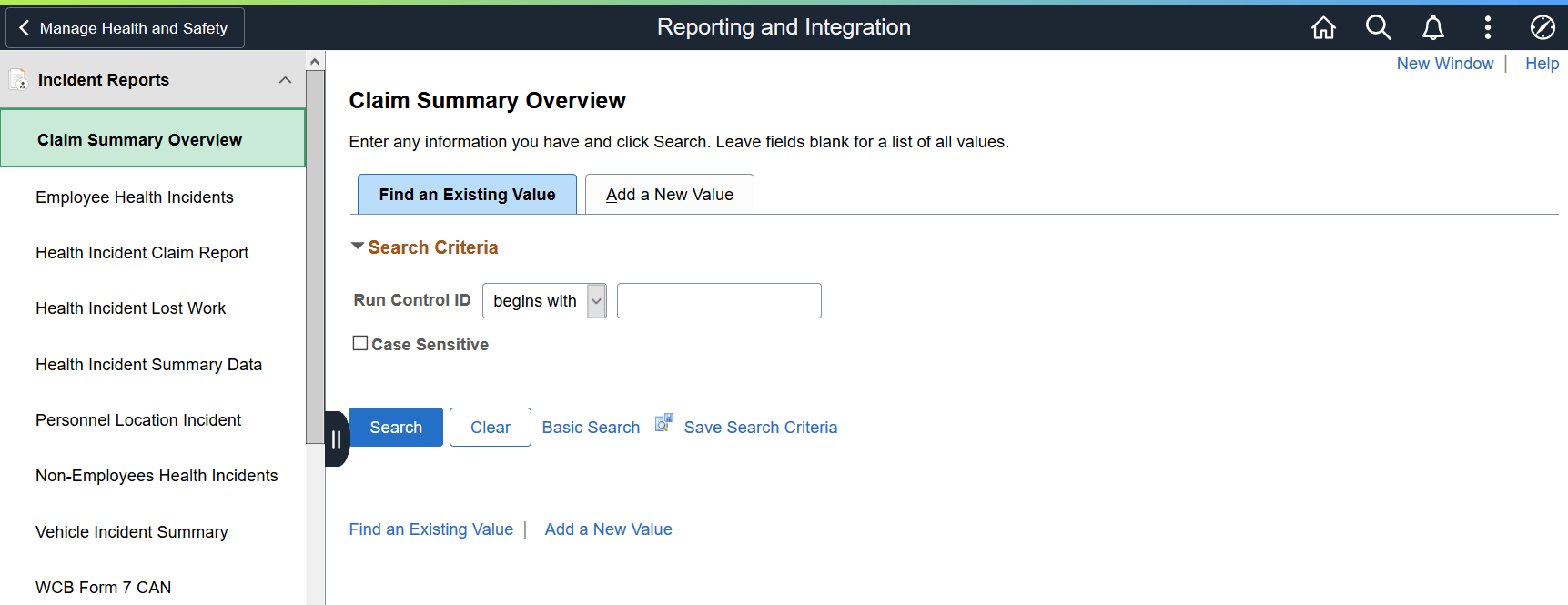
This Reporting and Integration application start page is a navigation collection that enables administrators to access Health and Safety reporting components from one location.
The application start page lists the components collected under these categories:
-
Incident Reports
-
Process and Collect Data
-
WCB Web Services CAN
-
Monitor Web Services CAN
-
OSHA Injury/Illness Reporting
-
Employee Work Restrictions
Rows that display a downward facing arrow are category headers. Select a category row to expand and view the component collection associated with that category.