Career Path Page
Use the Career Path page (HR_CP_PATH) to define an employee's own career path; modify a default career path; configure a job progression.
Navigation:
This example illustrates the fields and controls on the Career Path page. You can find definitions for the fields and controls later on this page.
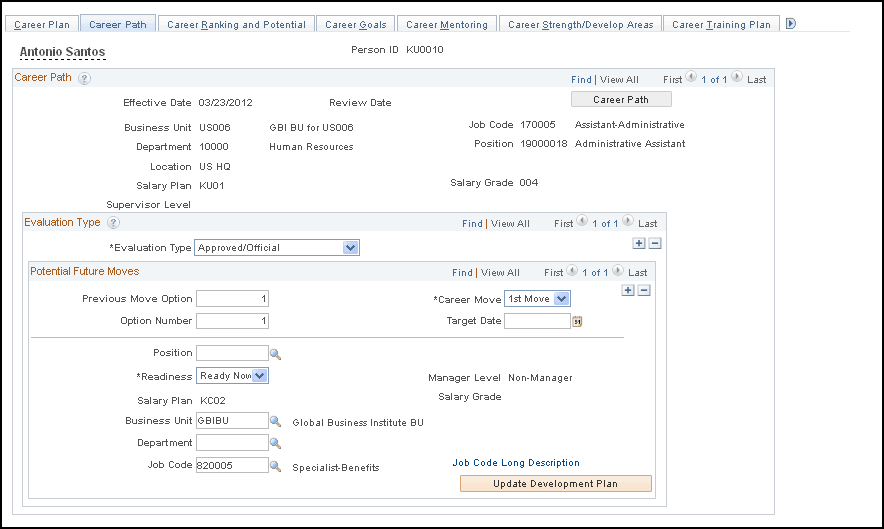
You can view and update your career path by selecting the desired positions or roles. When one or more roles are placed on your career path, you can see the required job skills, competencies, and experiences for each position or role, and the gap between your current profile and the profile requirements for the desired position.
You can define multiple career paths, operational or personal, and identify the single path that the organization uses in evaluating your potential and creating a performance and development plan based on this path.
| Field or Control | Description |
|---|---|
|
Update Development Plan |
Click to insert developmental areas into the your Career Development Plan based on the selected movement rows. The system inserts deltas for competencies and other profile topics as follows:
Once the identified competencies and other items are inserted into the Career Development Plan, the system opens the Career Development Plan page so that you can update related information about the inserted items, such as the Estimated Completion Date, and so on. |
|
Populate Career Path |
When only one row exists in the career path for your next interested job, click the Populate Career Path button to select the interested job row as a basis for inserting the position's career path from the Career Path table into your career path. |
|
Private Path |
Select to prevent managers from viewing the personal career path. |
|
Details |
Click an icon in this column to open the Career Move Details page. The Career Move Details page provides more information about the career move, specially for Military and federal data users. |