My Internal Resume Page
Use the My Internal Resume page (HR_CP_RESUME) to enable employees to select specific items to be included in an internal resume and create a personal resume for internal use.
To consolidate all work-related information, you can generate a personalized resume. Use this internal resume to apply for an open job or position within the organization.
Navigation:
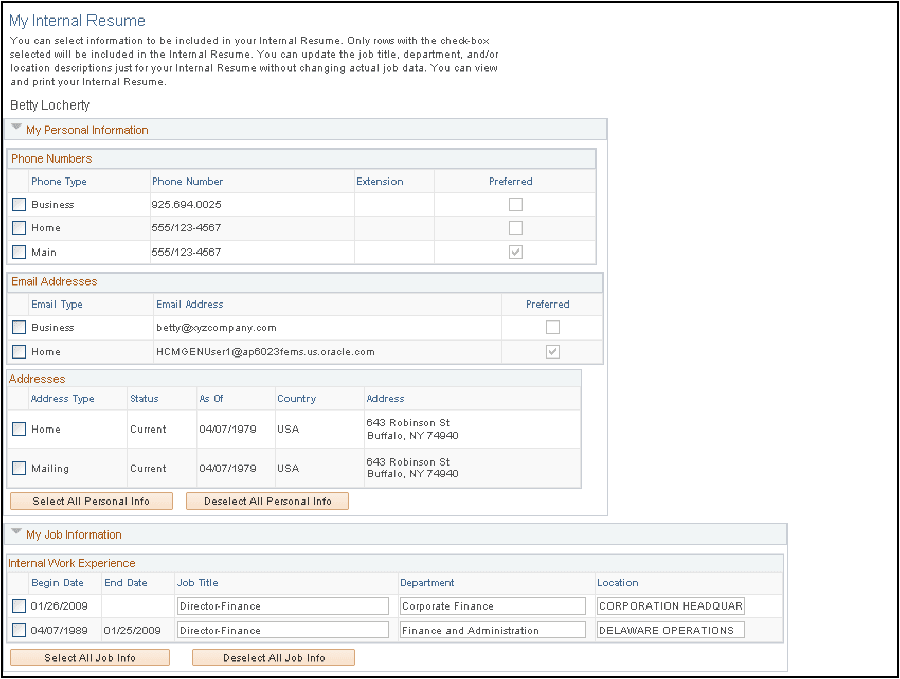
This example illustrates the fields and controls on the My Internal Resume page (1 of 3). You can find definitions for the fields and controls later on this page.
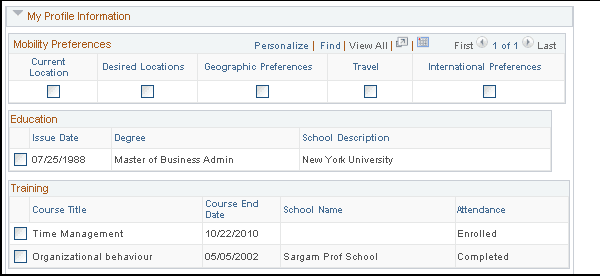
This example illustrates the fields and controls on the My Internal Resume page (2 of 3). You can find definitions for the fields and controls later on this page.
This example illustrates the fields and controls on the My Internal Resume page (3 of 3). You can find definitions for the fields and controls later on this page.
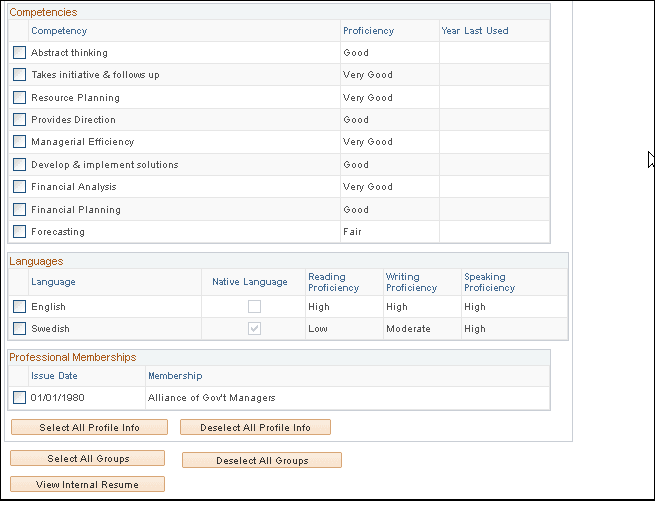
Select the information to include on an internal resume by selecting the check boxes associated with the desired data.
Note:
To update data on this page, use the My Profile and Personal Information self service pages.
| Field or Control | Description |
|---|---|
|
View Internal Resume |
Click to view or download the internal resume created from the selections made on this page. The system saves the internal resume using the Rich Text Format file format. |