Setting Up Tenure Tracking
To set up tenure tracking, use the Academic Rank (EG_RANK_TBL) and the Experience/Credit Codes (EG_EXP_DEFINITION) components.
Pages Used to Set Up Tenure Tracking
| Page Name | Definition Name | Usage |
|---|---|---|
|
EG_RANK_TBL |
Establish academic ranks, tenure tracking eligibility for those ranks, and probationary periods. Before using this page, set up the Faculty Calculation Group page. |
|
|
EG_EXP_DFN |
Set up the experience and credit codes that employees can earn at other institutions and apply toward tenure at your organization. Set up a credit code for start-up credit to bring forward any accrued service credit in your organization on the initial loading of tenure service data. |
Academic Rank Page
Use the Academic Rank page (EG_RANK_TBL) to establish academic ranks, tenure tracking eligibility for those ranks, and probationary periods.
Before using this page, set up the Faculty Calculation Group page.
Navigation:
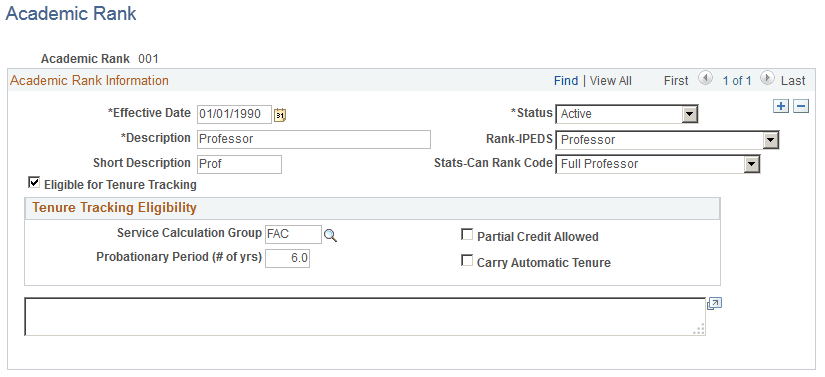
This example illustrates the fields and controls on the Academic Rank page.
Academic Rank Information
| Field or Control | Description |
|---|---|
|
Rank-IPEDS (rank Integrated Postsecondary Education Data System-Full Staff Survey) |
Select the rank for IPEDS reporting. Values are Assist Prf, Assoc Prf, Instructor, Lecturer, No Rank, or Professor. |
|
(E&G) Stats-Can Rank Code |
Select the Statistics Canada rank code for the academic rank. Different options are available depending on the effective. Dates up to and including September 20, 2009 have one set of options, dates on or after October 1, 2009 have a modified set of options. |
|
Eligible for Tenure Tracking |
Select if the academic rank is eligible for tenure tracking. This does not affect the tenure calculation process. |
Tenure Tracking Eligibility
| Field or Control | Description |
|---|---|
|
Service Calculation Group |
Enter the calculation group for this academic rank. For example, enter FAC (faculty) to include the associate professor rank in the faculty calculation group. |
|
Partial Credit Allowed |
Select if some credit applies toward tenure service. This does not affect the tenure calculation process. |
|
Probationary Period (# of yrs) (probationary period [number of years]) |
Enter the number of years this rank is in a probationary period. Employees can have multiple concurrent jobs, but they can accumulate probationary time toward tenure in only one academic rank at a time. |
|
Carry Automatic Tenure |
Select if tenure automatically applies to this rank. This does not affect the tenure calculation process. |
Experience/Credit Codes Setup Page
Use the Experience/Credit Codes Setup page (EG_EXP_DFN) to set up the experience and credit codes that employees can earn at other institutions and apply toward tenure at your organization.
Set up a credit code for start-up credit to bring forward any accrued service credit in your organization on the initial loading of tenure service data.
Navigation:
This example illustrates the fields and controls on the Experience/Credit Codes page.
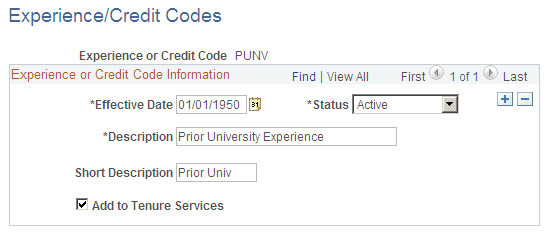
The tenure service accrual and calculation process uses the experiences and credits set up on this page to determine an employee's total time toward tenure as of a specified date.
| Field or Control | Description |
|---|---|
|
Add to Tenure Services |
Select if the experience or credit code counts toward tenure service in your organization. |